
editor, Author at Amazon Listing Service - Page 2 of 6

Author: editor

Amazon Vendor Chargebacks: Complete Guide to Prevention, Disputes & Fee Recovery

Amazon Vendor Chargebacks

Navigating the complex operational requirements of Amazon Vendor Central requires strict adherence to automated inbound fulfillment standards. For first-party (1P) suppliers, understanding Amazon vendor chargebacks is critical for protecting profit margins against automated operational penalties. These financial deductions occur when shipments fail to meet Amazon's strict packaging, labeling, or delivery guidelines.

Ignoring recurring operational defects quickly leads to severe margin erosion and strained vendor relationships. Partnering with specialized Amazon vendor chargebacks services helps brands audit fees, streamline disputes, and recover lost revenue efficiently. This comprehensive guide covers chargeback categories, financial impacts, dispute strategies, and automated prevention frameworks.

What Are Amazon Vendor Chargebacks?

Defining Amazon vendor chargebacks helps suppliers understand operational penalties issued by Amazon for non-compliant inbound shipments. These administrative fees compensate Amazon for the extra labor and processing time required to fix vendor mistakes in fulfillment centers.

It is essential to distinguish chargebacks from shortages, invoice deductions, and co-op promotional fees. While chargebacks address physical operational non-compliance, shortages reflect missing inventory units identified during receiving. Co-op deductions represent agreed marketing and operational allowances, whereas general deductions cover broader billing disputes.

How Amazon Vendor Chargebacks Work

The compliance lifecycle begins the moment a vendor accepts a Purchase Order (PO) and prepares inventory for shipment. Amazon tracks every stage of the logistics process using automated scanning equipment and vision systems across fulfillment networks.

Penalties originate at multiple operational touchpoints, including electronic data interchange (EDI) transmission, warehouse packing, and final carrier delivery. When automated receiving systems detect a defect, Amazon logs the violation, issues a penalty fee, and updates the supplier operational dashboard. Resolving these operational failures requires identifying the exact fulfillment stage where the compliance break occurred.

Reduce costly deductions and keep your Vendor Central account running smoothly.

Get expert Amazon vendor chargeback support

Types of Amazon Vendor Chargebacks

Amazon categorizes operational non-compliance into distinct defect types based on where the error occurs within the fulfillment pipeline. Identifying these specific categories enables vendors to deploy targeted corrective actions inside their processing warehouses.

Purchase Order Issues

Purchase order chargebacks occur when vendors fail to fulfill orders according to agreed quantities, ship windows, or cancellation rules. Examples include shipping items after the cancel date or failing to confirm orders within required timeframes.

Transportation Compliance

Transportation violations stem from failing to follow Amazon routing requirements or carrier booking instructions. Common examples include late freight deliveries, missed delivery appointments, and improper bill of lading documentation.

Receiving Compliance

Receiving compliance issues occur during physical unloading and sorting at Amazon fulfillment centers. Typical errors include floor-loaded shipments that require pallets, unstable pallet stacking, and missing safety prep.

Packaging Defects

Packaging defects involve physical carton or product prep failures that compromise item safety or handling. Examples include unapproved box dimensions, heavy cartons lacking warning labels, and inadequate protective dunnage.

Labeling Errors

Labeling penalties are triggered when scannable barcodes are missing, damaged, obscured, or improperly placed on cartons. Unscannable UPCs or incorrect carton content labels force warehouse staff to manually re-label items.

ASN Problems

Advanced Shipping Notice (ASN) chargebacks occur when digital shipping data fails to match the physical contents of an inbound shipment. Common triggers include missing ASNs, late EDI transmissions, and inaccurate unit count data.

Direct Fulfillment Issues

Direct fulfillment penalties apply to vendors operating dropship models directly to end consumers on Amazon's behalf. Violations include late dispatches, missing tracking numbers, and high order cancellation rates.

Import Compliance

Import compliance chargebacks target cross-border vendor shipments that violate international trade or customs documentation rules. Common issues involve missing commercial invoices, improper country-of-origin labeling, and sea container loading errors.

Why Amazon Issues Chargebacks

Amazon enforces strict operational standards across its entire global fulfillment network to maintain high operational speed. Understanding the underlying reasons for these financial penalties helps vendors align their logistics processes with Amazon expectations.

  • Operational efficiency: Automated receiving systems require standardized packaging and labeling to process millions of packages daily without manual handling delays.
  • Fulfillment standards: Enforcing uniform shipping rules prevents warehouse accidents, protects physical inventory from transit damage, and streamlines bin storage.
  • Vendor agreements: Chargebacks act as contractual enforcement mechanisms that encourage 1P suppliers to honor agreed shipping schedules and technical specs.

The Financial Impact of Chargebacks

Uncontrolled operational penalties directly erode gross profit margins and create significant administrative burdens for accounting teams. Analyzing the true cost of non-compliance demonstrates why immediate operational intervention is necessary for long-term viability.

  • Revenue leakage: Recurring penalty deductions reduce net vendor payouts, draining working capital that could otherwise fund product development or inventory expansion.
  • Margin erosion: Small percentage fees assessed across high transaction volumes quickly convert profitable product lines into loss-making operations.
  • Hidden operational costs: Investigating defects, gathering shipping evidence, and managing dispute correspondence consumes valuable internal labor resources.
  • Sample cost calculations: A vendor shipping 10,000 cartons monthly with a 5% ASN defect rate at $5 per carton loses $2,500 every month solely to preventable data errors.

How to Find Chargebacks in Vendor Central

Tracking down operational penalties requires regular auditing of financial reports inside the Amazon Vendor Central portal. Monitoring Amazon vendor chargebacks in Vendor Central allows teams to spot trends and audit dispute windows before claims expire.

Navigating to the Operational Performance dashboard reveals detailed defect trends, fee totals, and dispute statuses across all shipping categories. Vendors can download granular defect reports to review individual purchase order numbers, photo evidence, and specific error codes. Analyzing these performance trends weekly helps warehouse managers resolve underlying fulfillment breakdowns before penalties multiply.

How to Dispute Invalid Chargebacks

Amazon frequently assesses automated chargebacks in error due to scanning glitches or carrier delays outside vendor control. Partnering with expert Amazon vendor chargebacks services simplifies the dispute submission workflow and increases successful fee recovery rates.

  • Required documentation: Gather signed Bills of Lading, carrier proof of delivery, EDI transmission logs, time-stamped warehouse packing photos, and ASN confirmation receipts.
  • Dispute process: Submit formal dispute claims directly through the Vendor Central Operational Performance portal within thirty days of fee assessment.
  • Common reasons for rejection: Claims are frequently denied due to missing carrier signatures, incomplete POD documents, expired dispute windows, or vague evidence.
  • Escalation tips: Re-submit rejected disputes with secondary evidence, open support tickets for systematic scanning errors, and engage Vendor Manager assistance for major claims.

How to Prevent Amazon Vendor Chargebacks

Preventing financial penalties requires establishing robust operational controls across every phase of your supply chain and warehouse processing pipelines. Utilizing targeted Amazon vendor chargeback services identifies operational gaps before penalties occur.

  • Improve PO Accuracy: Confirm purchase orders promptly, ship within designated windows, and update backorder quantities accurately to avoid fulfillment cancellation fees.
  • Packaging Compliance: Use Amazon-approved carton dimensions, durable corrugated materials, and proper protective dunnage to prevent transit damage penalties.
  • Barcode Validation: Implement high-grade barcode printers and verifiers to guarantee every UPC and carton code scans cleanly at receiving hubs.
  • ASN Accuracy: Verify that electronic shipping notices transmit before physical shipment delivery and mirror exact carton contents.
  • Shipping Performance: Partner with reliable freight carriers who adhere to Amazon delivery appointments and provide prompt, signed proof of delivery.
  • Warehouse SOPs: Train warehouse personnel on strict packing standards, pallet height limits, and proper carton label placement rules.
  • Internal Audits: Conduct weekly random inspections of outgoing pallets to catch packaging and labeling errors before freight leaves your loading docks.

Automation Strategies to Reduce Chargebacks

Leveraging modern technology replaces error-prone manual data entry with automated workflows that ensure strict compliance across all order processing steps. Integrating digital supply chain tools eliminates human error and protects vendor profit margins.

  • EDI: Automate purchase order processing, order acknowledgments, and shipping notices to guarantee real-time digital compliance.
  • ERP integration: Connect enterprise software directly with Vendor Central to synchronize inventory levels, pricing data, and order fulfillment updates seamlessly.
  • WMS: Deploy advanced warehouse management software to guide packing routines, print compliant labels, and validate pallet stacking rules automatically.
  • Barcode automation: Utilize automated print-and-apply labeling systems to prevent human placement errors and ensure scannable barcodes on every box.
  • AI-powered compliance monitoring: Implement intelligent analytics tools that scan outbound shipment data, detect missing ASNs, and alert teams to potential compliance risks in real time.

Amazon Vendor Chargebacks

KPIs Every Amazon Vendor Should Track

Monitoring key performance indicators provides operational visibility and helps logistics managers evaluate the health of their Vendor Central account. Tracking core compliance metrics allows operational teams to address supply chain defects proactively.

  • Chargeback rate: The percentage of total shipment value lost to compliance penalties across operational categories.
  • Recovery rate: The percentage of disputed chargeback dollars successfully refunded by Amazon following formal appeals.
  • PO accuracy: The percentage of purchase order line items fulfilled accurately within agreed delivery windows.
  • Fill rate: The proportion of ordered product units successfully shipped relative to total vendor-confirmed quantities.
  • ASN accuracy: The frequency with which electronic shipping notices match physical package contents without data discrepancies.
  • On-time delivery: The percentage of inbound freight shipments that arrive at designated Amazon fulfillment centers within assigned appointment windows.
  • Receiving defect rate: The ratio of inbound cartons flagged for packaging, labeling, or prep errors during fulfillment receiving.

Conclusion

Protecting first-party vendor profitability requires shifting from reactive chargeback disputes to proactive operational compliance management. Mastering Amazon vendor chargebacks protects long-term profit margins while building a reliable, high-performing relationship with Amazon retail teams.

Establishing continuous warehouse auditing practices, adopting automated packing technologies, and training logistics staff ensures lasting supply chain success. Working with professional Amazon vendor chargeback services ensures ongoing compliance and fee recovery, allowing your brand to focus on scaling sales.

Frequently Asked Questions

1. What is an Amazon vendor chargeback?

An Amazon vendor chargeback is a financial penalty assessed against first-party suppliers for failing to meet operational or shipping standards. These automated fees cover the extra processing costs Amazon incurs when handling non-compliant inbound freight.

2. How long do vendors have to dispute a chargeback?

Vendors generally have thirty days from the date a chargeback fee is assessed to file a formal dispute in Vendor Central. Submitting dispute claims promptly with complete shipping documentation maximizes your chances of successful financial recovery.

3. Can chargeback fees be refunded?

Yes, Amazon will refund chargeback fees if vendors prove that the compliance error was issued incorrectly or caused by Amazon carriers. Providing clear proof of delivery, signed BOLs, and accurate EDI logs is essential for winning dispute appeals.

4. What is the most common cause of chargebacks?

Unscannable barcodes, inaccurate Advanced Shipping Notices, and late delivery appointments are among the most frequent compliance violations. Streamlining warehouse packing workflows and automating EDI communications resolves the majority of these recurring errors.

5. How do automated tools help prevent chargeback fees?

Automated systems validate shipping data, print compliant barcode labels, and transmit accurate ASNs before inventory leaves the warehouse. Preventing human data entry errors eliminates the root causes of operational non-compliance penalties.

Amazon Backend Keywords: Complete Guide to Boost Rankings and Maximize Product Visibility

Amazon Backend Keywords Complete Guide To Boost Rankings And Maximize Product Visibility

A product listing can look complete on the surface, with a strong title, clean bullet points, and good images, and still underperform in search because of what's missing behind the scenes. Backend keywords are the part of an Amazon listing that shoppers never see, yet they carry real weight in whether a product surfaces for the searches that matter. Sellers who treat this field as an afterthought are leaving indexing opportunities on the table, while sellers who understand how Amazon's search engine actually reads these fields tend to see broader visibility without touching their front-end copy at all.

This guide covers what backend keywords are, how Amazon's algorithm uses them, the technical rules that govern the field, where to enter them in Seller Central, how to research terms worth including, and how to verify that your keywords are actually indexed. It also looks at where AI-driven search is pushing backend optimization next.

What Are Amazon Backend Keywords?

Backend keywords are search terms entered into a hidden field within a product listing's backend attributes in Seller Central or Vendor Central. Shoppers never see this text. It doesn't appear in the title, bullet points, description, or anywhere on the live product page. Its only function is to help Amazon's search engine, A9/A10, understand additional ways customers might search for a product.

Amazon's search algorithm indexes a listing based on multiple fields: the title, bullet points, product description, and backend search terms. Front-end keywords, the ones visible in the title and bullets, need to read naturally because they're written for customers as much as for the algorithm. Backend keywords carry no such constraint. They exist purely for indexing, which means a seller can include synonyms, alternate spellings, and related terms that would look awkward or repetitive if forced into visible copy.

The distinction matters operationally. A title has to sell the product at a glance. The backend field has to catch every reasonable variation of how someone might phrase a search, without worrying about readability, grammar, or brand tone.


Get more from every Amazon listing with expert keyword research, optimization, and ongoing management.

Optimize My Store

Why Amazon Backend Keywords Matter

Backend keywords influence four areas of listing performance, and each has a direct line to revenue.

  1. Organic ranking: Amazon's algorithm matches search queries against indexed terms across a listing. A product that's indexed for more relevant search terms has more opportunities to appear in results, which is the first condition for ranking at all.
  2. Product discoverability: Customers rarely search using the exact vocabulary a brand uses internally. A kitchen brand might call a product a "storage container," while shoppers search "meal prep box" or "food organizer bin." Backend keywords bridge that vocabulary gap without cluttering the visible listing.
  3. Search indexing: Amazon needs to associate a listing with specific query terms before that listing becomes eligible to appear for those searches. Backend keywords are one of the primary mechanisms for building that association, particularly for terms that don't fit naturally into the title or bullets.
  4. Conversion relevance: Indexing for the wrong terms can drive traffic that doesn't convert, which hurts a listing's conversion rate and, over time, its ranking. Backend keywords should target terms that reflect genuine purchase intent, not just search volume.

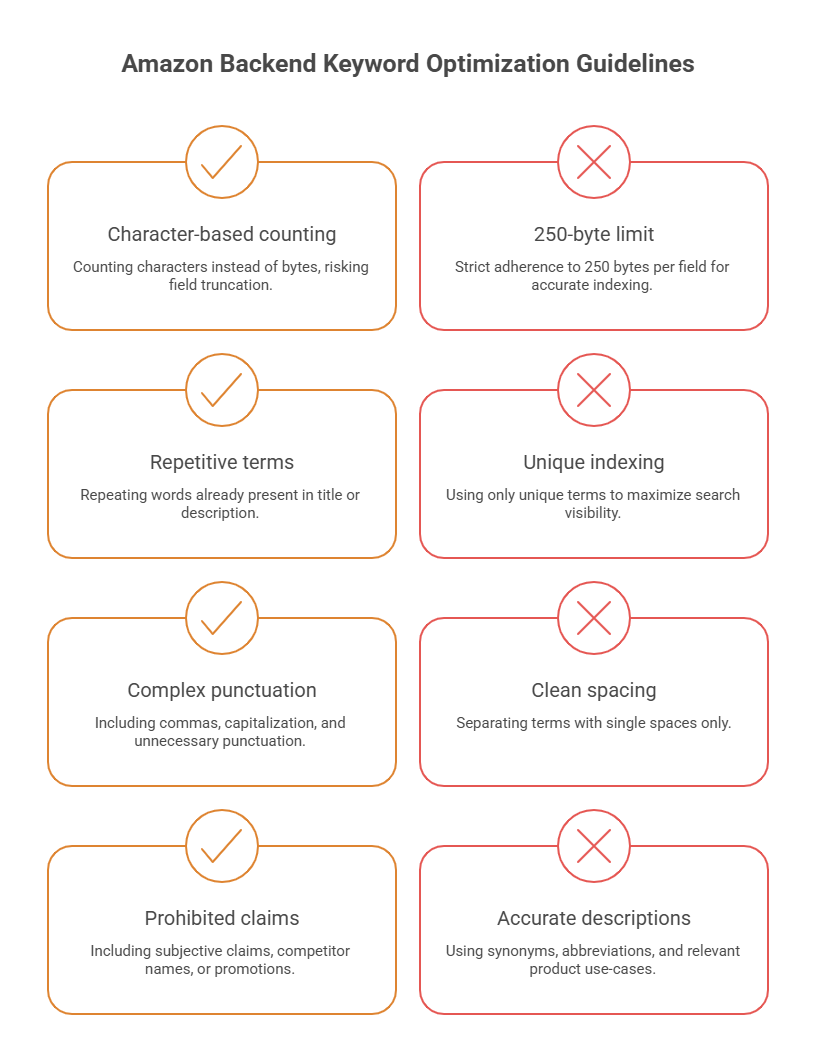
Amazon Backend Keyword Rules

Amazon enforces a specific set of technical constraints on the backend search terms field. Getting these wrong doesn't just waste space; it can cause Amazon to ignore the entire field or, in some cases, suppress the listing.

Rule

Detail

Byte limit 250 bytes per backend keyword field (not 250 characters; some characters, especially in non-Latin scripts, use more than one byte)
Duplicates Repeating a word already in the title, bullets, or description wastes byte space and adds no indexing value
Formatting No commas needed between terms; separate with single spaces. No need for punctuation, capitalization, or keyword repetition
Prohibited content No competitor brand names, no subjective claims ("best," "cheapest"), no ASINs, no temporary promotional terms ("free shipping," "on sale")
Brand restrictions Amazon prohibits using another brand's trademarked name in backend fields, and this can trigger listing suppression if flagged
Allowed variations Synonyms, alternate spellings, abbreviations, and relevant use-case terms are permitted as long as they accurately describe the product

Complete Guide to Boost Rankings and Maximize Product Visibility

Where to Add Backend Keywords in Seller Central

Backend keywords are entered through the listing editor, not the main product page fields.

  1. Log in to Seller Central and go to Manage Inventory.
  2. Select the product and click Edit.
  3. Navigate to the Keywords tab (this may appear as "Search Terms" depending on the account view and marketplace).
  4. Locate the Search Terms field and enter relevant terms, separated by spaces.
  5. Save the changes and allow time for Amazon to reindex the listing, which can take anywhere from a few hours to a couple of days.

Beyond the primary Search Terms field, some categories expose additional backend attributes worth using:

  • Subject Matter fields: This field lets sellers add category-specific descriptive terms that support indexing beyond the main search terms box.
  • Target Audience fields: It allows sellers to specify who the product is designed for (for example, age range or use case), which can support indexing for audience-specific searches.

Other backend attributes such as material type or intended use vary by category and should be filled out completely. Amazon can pull indexing signals from these structured fields as well as the free-text search terms box. Filling out every available backend attribute, not just the main keyword field, gives Amazon more structured data to match against customer searches.

How to Find High-Converting Backend Keywords

Effective backend keyword research pulls from several sources rather than relying on guesswork. Each method surfaces a different type of term, and combining them produces a more complete keyword set than any single source alone.

Method

What It Reveals

Amazon Search Suggestions Autocomplete phrases Amazon surfaces as customers type, reflecting real, current search behavior
Competitor Analysis Terms competitors are targeting in their titles and bullets, useful for identifying gaps in your own listing
Reverse ASIN Research Keywords a specific competitor ASIN is already ranking for, typically pulled through third-party research tools
Brand Analytics Search frequency and click/conversion share data available to registered brand owners through Seller Central
Search Query Performance Reports Data on which search terms are already driving impressions, clicks, and purchases for your own listings
PPC Search Term Reports Actual customer search terms that triggered ad clicks and conversions, pulled from Sponsored Products campaigns
AI-Powered Keyword Research Tools Third-party tools that use language models to generate synonym clusters and long-tail variations at scale

Search Query Performance and PPC search term data are generally the most reliable sources, since they reflect confirmed customer behavior on your own products rather than estimated volume. Reverse ASIN research and competitor analysis are useful for finding terms you haven't considered, while Amazon Search Suggestions and AI-powered tools help round out long-tail and synonym coverage.

How to Check Keyword Indexing

Adding a keyword to the backend field doesn't guarantee Amazon has indexed it. Verifying indexing is a separate step.

  • Manual ASIN method: Search the exact keyword phrase on Amazon, then use the "ASIN search" trick: search the keyword followed by your product's ASIN in the search bar. If the listing appears, it's indexed for that term. If it doesn't appear at all, even far down the results, it likely isn't indexed.
  • Index checking tools: Several third-party tools automate this process by checking a batch of keywords against a listing simultaneously, which is faster than manual checks when working with a large keyword set.
  • Monitoring performance: Beyond a binary indexed/not-indexed check, it's worth tracking whether indexed terms are actually generating impressions and clicks through Search Query Performance reports. A term can be indexed and still contribute nothing if it doesn't reflect real search demand.

Amazon Backend Keyword Best Practices

A well-optimized backend keyword strategy helps your products appear in more relevant searches while making the most of Amazon's limited keyword space.

  • Include Synonyms: Add alternative words and phrases customers commonly use to describe the same product. This expands your keyword coverage without repeating terms already used in the title.
  • Include Common Misspellings: Add frequently misspelled versions of relevant keywords where appropriate. Amazon can still match these searches, helping your listing capture additional traffic.
  • Prioritize Long-Tail Keywords: Focus on specific, multi-word search phrases that reflect stronger purchase intent. These keywords are often less competitive and more likely to drive qualified traffic.
  • Add Regional Spelling Variations: Include spelling differences used across English-speaking marketplaces, such as color and colour. This improves discoverability for customers in different regions.
  • Include Contextual Phrases: Add keywords related to product use cases, occasions, or customer needs. These terms help your listing appear for searches that don't directly mention the product category.
  • Update Keywords Seasonally: Review and refresh backend keywords to reflect seasonal trends, holidays, and changing customer search behavior. Regular updates help keep your listing relevant throughout the year.

Common Amazon Backend Keyword Mistakes

Avoiding these common mistakes ensures your backend keywords remain relevant, compliant with Amazon's guidelines, and effective at improving product visibility.

  • Keyword Stuffing: Avoid repeating the same keyword in multiple forms. Doing so wastes valuable backend space without improving search visibility.
  • Duplicating Title or Bullet Keywords: Do not repeat keywords that already appear in your title or bullet points. Amazon already indexes visible listing content, making duplication unnecessary.
  • Using Competitor Brand Names: Never include competitor trademarks or brand names in backend keywords. This violates Amazon's policies and can result in listing suppression.
  • Exceeding the Byte Limit: Keep your backend keywords within Amazon's 250-byte limit. Any terms beyond this limit are typically ignored during indexing.
  • Leaving Outdated Keywords: Remove seasonal, discontinued, or no-longer-relevant terms during regular optimization. Replacing them with current keywords makes better use of the available space.

AI and the Future of Amazon Backend Keywords

Amazon's search experience is shifting, and backend keyword strategy is shifting with it. Amazon has been integrating generative AI features into the shopping experience, including tools that summarize products and answer shopper questions directly within search and product pages. This changes how listings need to be indexed, since AI-generated answers pull from the same structured and unstructured listing data that traditional search ranking relies on.

As more customers use natural-language queries, whether through voice assistants or AI shopping tools, exact-match keyword phrases matter less than semantic coverage. A backend field built entirely around short, literal keywords may miss the longer, conversational phrasing these tools generate.

Search relevance is increasingly evaluated on contextual meaning rather than literal keyword matching alone. This favors listings with a well-rounded backend field that includes use-case language and related concepts, not just a list of isolated nouns.

Conclusion

Backend keywords are a low-visibility, high-leverage part of Amazon listing optimization. They don't require rewriting a title or redesigning bullet points, but they do require research discipline, attention to Amazon's technical formatting rules, and periodic review as search behavior and seasonal demand shift.

Getting this field right expands how many relevant searches a listing can appear in without compromising the customer-facing copy that's built to convert. For sellers looking to build a more systematic approach to Amazon listing optimization, this is an area where dedicated operational support tends to pay for itself in recovered visibility.

Frequently Asked Questions

1. What is the backend keyword limit?

Amazon allows up to 250 bytes per backend search terms field. This is a byte limit, not a character or word count, so multi-byte characters and long words can use up the available space faster than expected.

2. Do backend keywords improve rankings?

Backend keywords support indexing, which is a prerequisite for ranking. They help a listing become eligible to appear for a wider range of relevant searches, but they work alongside other ranking factors like conversion rate, sales history, and pricing, not as a standalone ranking lever.

3. Should I repeat title keywords in the backend field?

No. Terms already present in the title, bullets, or description are typically already indexed through those fields, so repeating them in the backend field wastes limited byte space that could go toward new terms.

4. Can I use competitor brand names as backend keywords?

No. Amazon's policies prohibit using another brand's trademarked terms in backend fields, and doing so can result in listing suppression or account-level enforcement action.

5. How often should backend keywords be updated?

A quarterly review is a reasonable baseline for most categories, with additional updates ahead of relevant seasonal periods or after launching new campaigns that reveal new high-performing search terms.

6. Are backend keywords different for Vendor Central?

The underlying concept is the same, though the interface and available backend attribute fields can differ slightly between Vendor Central and Seller Central depending on category and account setup.

7. Do backend keywords affect PPC?

Backend keywords primarily affect organic indexing rather than Sponsored Products targeting directly, since PPC campaigns use their own keyword targeting settings. However, strong organic indexing can support overall listing relevance, which indirectly benefits advertising performance.

8. How can I verify keyword indexing?

Use the manual ASIN search method, a third-party index checking tool, or Search Query Performance reports to confirm whether a specific term is indexed and whether it's generating actual search traffic.

Amazon Negative Feedback Management: Complete Guide to Removing and Preventing Negative Seller Feedback

Amazon Negative Feedback Management

Maintaining an excellent public reputation inside the global marketplace is one of the most critical aspects of protecting your e-commerce revenue lines. While many business owners spend their working hours optimizing product listings, a sudden influx of poor merchant scores can completely stall sales momentum. Understanding how to handle customer friction and preserve your operational dashboard status is essential for survival.

This comprehensive guide breaks down the methods required to combat unfair ratings and clean up your public merchant history. You will learn the exact regulatory parameters that allow for complete comment removal and how to structure strategic public answers. Implementing these systems protects your administrative health and keeps your product buy boxes active.

What Is Amazon Seller Feedback?

Seller feedback is a public, star-based evaluation system that grades a merchant's operational fulfillment performance rather than the physical attributes of an item. Buyers use this portal to share their direct experiences regarding shipping speeds, packaging safety, and overall merchant communication. This specific rating score is attached directly to your merchant profile and is visible to shoppers viewing the competitive seller listings.

  • Definition: A scoring system from one to five stars used by buyers to evaluate a store's logistical efficiency.
  • Where Feedback Appears: The historical data displays inside the "Ships from and Sold by" information blocks and on your main storefront biography pages.
  • How Feedback Affects Buyers: Shoppers look closely at your historical fulfillment percentage to decide whether to buy from you or choose a competing reseller.

Seller Feedback vs. Product Reviews

Many digital brands fail to realize that the marketplace divides customer feedback into two completely separate rating environments. While a merchant review grades the administrative and shipping performance of your corporate team, a product review focuses solely on the functionality of the item itself. Confusing these two components can lead to poor dashboard management and missed optimization opportunities.

Keep your feedback score strong with expert support for Amazon seller account management.

Improve Seller Rating


Metric Attribute

Seller Feedback

Product Review

Primary Evaluation Object Logistical execution, delivery speed, and customer care quality Design features, functional reliability, and item performance
Dashboard Placement Custom merchant profile summary tab pages Main product detail listings below the description fields
Typical Example Case "The box arrived crushed and three days past the promised delivery date" "The internal battery does not hold a charge for more than an hour"
System Visibility Impact Change your Order Defect Rate and buy box eligibility parameters Drives your primary search ranking positions and consumer click-through rates

Why Negative Seller Feedback Matters

Allowing one-star or two-star merchant ratings to sit on your storefront profile directly damages your overall sales capabilities. The e-commerce algorithm tracks your score variations to determine whether your enterprise deserves premium positioning. Utilizing targeted Amazon customer service solutions helps you quickly address these problem entries before they affect your business performance.

  • Impact on Feedback Rating: A sudden collection of poor ratings lowers your total positive metric percentage, which turns away cautious shoppers.
  • Order Defect Rate (ODR): One-star or two-star reviews directly raise your ODR score, which must stay below one percent to prevent full account suspension.
  • Account Health: The centralized monitoring dashboard tracks poor consumer ratings as a key indicator of commercial operational risk.
  • Buy Box Eligibility: Low performance percentages will cause the algorithmic pricing systems to strip away your featured offer visibility.
  • Customer Trust: Clean storefront histories show business buyers using Amazon Business customer service portals that your supply chain is reliable.

Amazon's Seller Feedback Removal Policy

The marketplace maintains strict rules defining what types of buyer comments are acceptable on merchant profile pages. When a customer uses the wrong feedback channel to complain about a product, you can request an automated review. Knowing these specific rule definitions helps your support team clean up your profile history.

  • Feedback Eligible for Removal: Reviews that are entirely focused on product quality rather than shipping logistics can be quickly removed from your account.
  • Feedback That Cannot Be Removed: Legitimate complaints regarding late deliveries or poor communication on merchant-fulfilled orders cannot be deleted under current policy guidelines.
  • Automatic Removal Scenarios: If a buyer includes explicit language or shares private personal contact information, the automated review tools will instantly remove the comment.
  • Policy Violation Examples: Comments where a buyer uses your store feedback block to promote a competing company will be taken down for violating marketplace rules.

How to Remove Negative Seller Feedback

Removing incorrect ratings requires working through the specialized management interfaces provided inside Seller Central. Your staff must follow the proper submission rules to avoid having your clean-up appeals automatically denied by the system.

  • Access Feedback Manager: Open your main performance tab menu and select the Feedback Manager link to display your recent buyer ratings history.
  • Submit a Removal Request: Find the specific negative comment line, select the actions dropdown menu, and click the request removal option.
  • Appeal Rejected Requests: If the initial automated tool denies your request, you can open a case log to provide extra proof to a live support agent.
  • Monitor Request Status: Check your open case history daily to verify when the system removes the unfair rating data from your public profile scores.

How to Respond to Negative Feedback Professionally

When a valid complaint cannot be deleted under current platform rules, you must write a professional public response. Your written answer is not just for the unhappy buyer; it shows future storefront visitors how your brand handles customer service issues. Deploying professional Amazon customer service solutions in public view helps rebuild trust with potential buyers browsing your store.

  • Public Responses: Keep your public replies short, polite, and completely focused on solving the problem, without showing anger or frustration.
  • Buyer Communication Guidelines: Avoid offering financial bribes or free products in exchange for rating changes, as this violates strict terms of service rules.
  • Resolution Best Practices: Apologize for the shipping issue directly and move the conversation to secure communication channels to arrange a replacement.
  • Sample Response Templates: Use professional frameworks like: "We apologize for the fulfillment delay. We have upgraded our logistics network to prevent this issue from happening again."

How to Request a Feedback Revision

If you resolve a buyer's issue by sending a fast replacement or a partial refund, you can politely ask them to update their rating. The platform allows shoppers to change their original reviews if they feel the merchant solved the problem well. However, you must word these messages carefully to stay compliant with communications rules.

  • When to Ask: Only send a revision request after you have completely fixed the customer's problem and confirmed they are happy with the resolution.
  • Amazon Policy Considerations: You are allowed to ask for an update, but you cannot pressure the customer or tie a refund to their review change.
  • Example Revision Request Message: "We are glad your replacement arrived safely. If you feel our support team resolved your issue well, please consider updating your store rating through your account portal."

Amazon Negative Feedback Management Workflow

Managing your storefront profile requires a clear, daily system for tracking and resolving buyer complaints. A chaotic approach to customer issues can cause your team to miss key policy appeal windows. Follow this organized workflow to keep your negative ratings minimal.

Amazon Negative Feedback Management Workflow

Preventing Negative Seller Feedback

The most efficient way to maintain a perfect storefront rating is to optimize your logistics so customers never have a reason to complain. Building a reliable fulfillment process keeps your defect numbers low and reduces your customer service workload.

  • Accurate Product Listings: Ensure your sizes, material descriptions, and dimensions match your physical inventory perfectly to prevent buyer surprises.
  • Fast Shipping: Dispatch your merchant-fulfilled packages within your promised windows, or use FBA channels to guarantee fast deliveries.
  • Inventory Management: Sync your warehouse management software regularly to prevent stockouts and unexpected order cancellations.
  • Customer Service: Train your internal team to answer buyer questions quickly and professionally using approved communication channels.
  • Returns Handling: Simplify your return and refund processes to prevent simple product returns from turning into public complaints.
  • Proactive Communication: Send friendly tracking updates through the message console if an external carrier encounters unexpected delivery delays.
  • Quality Control: Check your master shipping boxes regularly to ensure your products have enough padding to survive rough transit handling.

Using Automation to Manage Seller Feedback

As your e-commerce storefront grows, tracking customer messages manually becomes difficult for internal support teams. Using specialized software tools helps you monitor your ratings and respond to buyer issues in real time.

  • Helpdesk Platforms: Connect all your seller accounts into a single dashboard to simplify how your team manages customer messages.
  • CRM Integrations: Match incoming buyer reviews with historical customer order details to resolve issues much faster.
  • AI-Generated Response Drafts: Use smart text suggestions to quickly draft polite, professional answers for common delivery issues.
  • Sentiment Analysis: Use automated scanning tools to flag angry customer messages early, allowing you to prioritize high-risk issues.
  • Alerts and Dashboards: Set up instant phone or email notifications to alert your managers whenever a one-star review hits your profile.

Common Mistakes to Avoid

Many brands make simple strategy mistakes that accidentally lower their merchant reputation scores. Avoiding these communication errors protects your business standing and keeps you compliant with platform policies.

  • Confusing Reviews with Feedback: Wasting time writing public responses to product reviews inside your seller feedback tab instead of using the proper removal tools.
  • Violating Amazon Communication Policies: Offering gifts, cash refunds, or discount codes to customers in exchange for removing negative reviews.
  • Delayed Responses: Leaving bad reviews sitting on your profile for weeks without trying to fix the customer's problem or file an appeal.
  • Ignoring Trends: Treating repetitive complaints about broken boxes as one-off issues instead of fixing your packaging process.
  • Requesting Reviews Improperly: Sending too many follow-up messages to buyers can annoy them and trigger a negative rating.

Conclusion

Mastering Amazon Negative Feedback Management is an ongoing necessity for safeguarding your buy box visibility and keeping your account in good standing. By continuously tracking your incoming reviews, appealing rule-breaking comments, and resolving customer issues quickly, you protect your long-term marketplace growth. Setting up a reliable daily management routine keeps your public metrics clean and professional.

As your sales volume scales up, keeping your merchant profile spotless requires deep policy knowledge and fast customer service execution. Working with an expert Amazon Negative Feedback Management provider gives your team the specialized tools needed to handle complex data drops and optimize your profile metrics. Build a strong, proactive customer support foundation today to keep your brand at the top of marketplace search results.

Frequently Asked Questions

1. Can Amazon remove all negative feedback?

No, the compliance systems will only remove bad feedback that explicitly breaks their written platform rules. If a customer shares a valid complaint about late shipping on a merchant-fulfilled order, that rating will stay on your profile.

2. Can buyers edit feedback?

Yes, customers can remove or update their original storefront reviews through their personal account settings within 60 days of posting. However, you cannot use financial rewards or free products to pressure them into changing their score.

3. Does FBA feedback count against sellers?

If an order is shipped using Fulfillment by Amazon and arrives late or damaged, you can request an official strike-through review. The marketplace will leave the comment on your profile but add a line apologizing for the delivery error, which prevents it from hurting your ODR score.

4. How long does feedback remain visible?

Public store ratings stay active on your merchant profile page permanently, but your primary star ratings are calculated using your trailing 30, 90, and 365-day performance metrics. Older reviews have a much smaller impact on your modern buy box eligibility scores.

5. Can feedback be struck through?

Yes, the platform will cross out bad feedback if the transaction was handled via FBA or if the issue was caused entirely by an approved buy-shipping carrier. The struck-through review remains visible to buyers but does not hurt your official defect metrics.

6. How does negative feedback affect the Buy Box?

A sudden drop in your seller score tells the system that your fulfillment network is struggling, which can cause your buy box share to drop. If your positive rating slips below 90 percent, you may lose your featured offer spots to competing sellers entirely.

7. Can you appeal a denied removal request?

Yes, if the automated manager tool incorrectly turns down your initial deletion request, you can open a manual case file through your support menu. You must submit clear proof showing exactly how the comment breaks platform rules to have a support agent review the file.

Amazon Store Analytics: Complete Guide to Tracking, Measuring, and Optimizing Store Performance

Amazon Store Analytics

Building an immersive, multipage digital storefront on the global marketplace is only the first phase of an effective brand-scaling strategy. Enterprise merchants must continuously evaluate how shoppers move through their custom layouts, identify drop-off zones, and track real-time revenue performance. Without this granular operational data, your storefront design choices are based entirely on guesswork rather than clear market insights.

This ultimate guide breaks down how to read your backend traffic metrics to build more profitable consumer experiences. You will learn how to measure page engagement, attribute off-platform marketing campaigns, and use specialized visual tools to grow your average order values. Implementing a structured optimization model helps you turn casual store browsers into repeat brand buyers.

What Is Amazon Store Analytics?

This native reporting environment is a powerful metrics center that provides deep visibility into your custom storefront's overall health and consumer engagement. The dashboard breaks down individual traffic streams, page interactions, and multi-day sales attribution numbers for registered brand owners. Using these performance files lets you see exactly how your customized layouts impact consumer purchasing choices.

  • Performance Monitoring: The interface continuously monitors unique visitor counts, total views, and calculated conversions across every individual subpage in your layout.
  • Source Attribution: The system creates unique tracking tags to isolate how much traffic comes from specific sources like organic search, Sponsored Brands campaigns, or off-site social media channels.
  • Operational Control: Utilizing a comprehensive Amazon store setup services package ensures your analytics framework is built correctly from day one to capture clean buyer transaction histories.

Amazon Store Analytics vs Brand Analytics vs Retail Analytics

Many e-commerce teams confuse the storefront reporting panel with separate analytic features hidden inside Seller Central. While individual reporting systems are valuable on their own, they pull completely different data arrays to monitor distinct parts of your business. Mixing up these data streams can cause inaccurate performance readings and lead to poor business decisions.

Gain actionable insights to improve traffic, engagement, and sales across your Amazon Store.

Analyze My Store


Analytics Platform

Core Data Focus

Primary Operational Use Case

Amazon Store Analytics Direct storefront traffic, unique page sessions, and attributed shop sales Evaluating storefront layout performance and off-platform tag conversions
Brand Analytics Search catalog terms, customer purchase behavior, and competitive repeat purchases Expanding target keyword lists and studying broad demographic buying habits
Retail Analytics Gross manufacturing order histories, vendor fulfillment speeds, and stock forecasting Managing inventory procurement cycles and monitoring vendor chargebacks

Who Can Access Amazon Store Analytics?

Entering this specialized performance workspace requires a fully verified corporate profile inside the global marketplace registry. This dashboard is completely hidden from casual resellers or unverified wholesale accounts because it requires clear intellectual property ownership. Your company must pass the formal brand registration process to unlock your custom storefront builder and its data reports.

  • Registered Brand Owners: Active merchants who have completed the official marketplace brand registry process gain full dashboard access.
  • Authorized Agencies: Third-party specialists who are assigned explicit management permissions through the centralized corporate advertising console.
  • First-Party Vendors: Enterprise manufacturers utilizing premium wholesale networks who can access storefront metrics directly inside their ad managers.
  • Global Advertisers: Account administrators running active sponsored marketing campaigns who use storefront links as main landing destinations.

How to Access Amazon Store Insights

Reaching your storefront performance panel requires navigating through your centralized digital advertising console interface. The system updates your consumer transaction histories daily to help you track ongoing marketing adjustments. Follow these quick steps to find your primary performance metrics dashboard.

  • Step 1: Log into your primary Seller Central account profile and open your main advertising navigation menu.
  • Step 2: Select the Stores option from the dropdown menu and click on the Manage Stores button.
  • Step 3: Find your active brand name on the catalog registry index list and select the adjacent View Insights option.
  • Step 4: Set your primary evaluation date ranges using the calendar filter to populate your custom performance charts.

Understanding the Amazon Store Analytics Dashboard

The primary user interface displays a comprehensive set of reporting filters designed to isolate distinct shopping trends across your digital catalog. Each reporting section focuses on a specific phase of the customer buying process, from initial discovery to final checkout. Mastering these specific diagnostic tabs helps your marketing team allocate budgets efficiently.

Visitors

This reporting section displays the total number of unique daily shoppers or devices that loaded at least one subpage on your storefront within a set period. Tracking this figure reveals the true reach of your brand presence, filtering out repetitive views from single users.

Page Views

This metric tracks the gross number of times a subpage is loaded by online searchers, including multiple views from the same session. Comparing this metric against unique visitor volumes shows how deeply customers are exploring your content categories.

Sales

This field displays the estimated total dollar value of products ordered by storefront visitors within 14 days of their last visit. The system connects these sales to your pages, even if the final transaction occurred later on a standard listing page.

Units Sold

This category tracks the absolute volume of physical products purchased by customers during an attributed storefront visit window. Monitoring unit volumes helps you spot emerging seasonal demand trends before they impact your core fulfillment centers.

Traffic Sources

This critical section categorizes all your incoming storefront traffic into four primary paths: Sponsored Brands ads, organic search results, custom tracking tags, or direct external web links. This breakdown tells you exactly which marketing investments are delivering the highest financial returns.

Top Pages

This performance view ranks your individual storefront subpages based on view volumes, engagement depth, and total sales generation. Identifying your best-performing layouts gives you a clear blueprint for structuring new product launches.

Page Engagement

This metric measures user interaction depth by calculating the ratio of product link clicks to total page loads. Low engagement rates mean your visual graphics are not interesting enough to drive clicks to your product pages.

Key Amazon Store Metrics Explained

To read your performance data correctly, you must look past simple vanity metrics like total page views. Focusing heavily on your unit session percentages and post-visit sales numbers shows you how much revenue your layout is actually generating.

  • Dwell Time: The average duration a consumer spends browsing your storefront layout during a single unique session visit.
  • Bounce Rate: The percentage of visitors who leave after viewing just one page without interacting with your product widgets.
  • Sales Per Visitor: The average dollar amount generated from every single unique customer who visits your storefront.
  • New-to-Store Customers: The percentage of transactions completed by buyers who have not purchased from your catalog in the past year.

How to Analyze Store Performance

Evaluating your storefront requires connecting traffic shifts with clear conversion changes across your entire catalog. You must look at how your traffic sources interact with your product collection blocks to find hidden sales bottlenecks.

  • Step 1: Check your top pages chart to see if your primary revenue numbers are coming from your home page or specific category tabs.
  • Step 2: Review your traffic sources to confirm if your paid ad campaigns are outperforming your organic search traffic placements.
  • Step 3: Contrast your average dwell times against your bounce rates to test how engaging your subpage text blocks are.
  • Step 4: Look for page engagement drops to see where shoppers lose interest and exit your storefront.

Using Analytics to Optimize Your Amazon Store

Once you gather your baseline conversion statistics, you can make targeted design updates to improve your customer journey. Routine page updates keep your layout feeling fresh and direct shoppers toward your highest-margin products.

Improve Navigation

Use your top pages report to reorder your navigation tabs so your most popular categories are easy to find. Simplifying your menu structure reduces buyer friction and helps shoppers find relevant items in fewer clicks.

Optimize Product Collections

Move your best-selling product widgets to the top of your subpages to maximize visibility and capture quick conversions. If a product collection shows low engagement metrics, replace those items with trending alternatives.

Enhance Creative Assets

Replace static graphics with lifestyle videos on pages where data shows low customer dwell times. Adding high-resolution visual assets helps clarify product benefits and encourages shoppers to spend more time browsing your store.

Refine Landing Pages

Align your custom source tags with specific product subpages instead of sending all external traffic to your home page. Delivering shoppers to a highly relevant landing page improves conversion rates and lowers your bounce metrics.

How Amazon Advertising Works with Store Analytics

Your digital storefront acts as the primary landing page for high-converting Sponsored Brands and Sponsored Display ad campaigns. Connecting your paid marketing campaigns with your storefront data creates a clear picture of your complete advertising lifecycle.

The system uses advanced tracking models to monitor how shoppers behave after clicking on a headline banner ad. You can track this performance by building custom source tags for your social media campaigns and influencer promotions. Studying these combined data points lets your team lower your total ad spend while increasing your organic revenue.

Best KPIs to Track Weekly and Monthly

Building a reliable optimization rhythm requires separating your daily operational tracking from long-term strategic reviews. Focusing on the right metrics at the right times prevents your team from making hasty adjustments based on short-term traffic shifts.

  • Weekly Metric Tracking: Monitor unique visitor volume, immediate ad traffic attribution shifts, and sudden drops in buy box percentages.
  • Weekly Conversion Audits: Track changes in your primary page engagement scores right after launching new product lines.
  • Monthly Strategy Reviews: Evaluate your total sales per visitor trends, long-term dwell time changes, and year-over-year category growth.
  • Monthly Budget Balancing: Read your traffic source performance to adjust your spending split between Amazon ads and external marketing channels.

Amazon Store Analytics Reporting Template

To keep your design choices organized, your marketing team should compile their findings into a standardized performance dashboard. Use this clean structural template layout to track your core storefront metrics month-over-month.

  • Storefront Health Summary: Track total gross sales, unique site visitors, gross page views, and your average conversion rates.
  • Traffic Allocation Index: Log absolute traffic numbers from Sponsored Brands, organic placement routes, and external custom tags.
  • Page Hierarchy Breakdown: Document individual view counts, specific bounce rates, and total revenue lines for every active subpage.
  • Action Plan Checklist: Outline your planned creative changes, target keyword updates, and upcoming layout updates based on current data.

Common Mistakes to Avoid

Many brands hurt their storefront optimization by misinterpreting their data or making rushed updates. Avoid these common mistakes to keep your rankings stable and ensure clean reporting.

  • Over-Optimizing Too Quickly: Changing your image assets and text blocks before a page gains enough traffic ruins your data baseline.
  • Ignoring External Source Tags: Running external influencer campaigns without unique tracking tags leaves you blind to off-platform conversion performance.
  • Disregarding Mobile Layout Previews: Forgetting to test how your storefront tiles look on smartphones can cause text cut-offs that turn mobile buyers away.
  • Leaving Outdated Holiday Content Active: Leaving winter promotional banners live into the spring hurts brand authority and lowers customer trust.

Real Examples of Store Optimization Using Analytics

A premium kitchenware brand noticed that their specialty baking subpage generated high views but very low conversion numbers. After reviewing their dashboard, the brand discovered that customers were bouncing because the page lacked clear pricing options. To fix this, the team updated the layout using a clear product grid widget that allowed buyers to add items to their carts instantly. This small layout update increased page sales by 42% over the next 30 days.

Another clean example involves an apparel brand that used a comprehensive Amazon store management package to track its off-platform marketing traffic. Their analytics dashboard revealed that direct social media ad campaigns had a high bounce rate when landing on the generic store home page. By redirecting those links to targeted category pages, the brand increased its average dwell time by more than 90 seconds.

Best Practices for Growing Sales with Amazon Store Analytics

Consistently growing your digital revenue requires turning your data insights into continuous optimization steps. Brands that treat their storefront as an evolving retail asset always outperform static catalogs.

  • Run Continuous Creative Tests: Test different video placements against static lifestyle imagery on your main home page tile fields to see what drives more interaction.
  • Match Ads with Specific Subpages: Route your headline ads to matching category subpages instead of dropping buyers onto a generic home page.
  • Utilize Professional Management Support: Partnering with an expert Amazon store management specialist helps you navigate complex data drops and optimize your assets efficiently.
  • Clean Up Low-Performing Pages: Remove subpages that consistently show high bounce rates and low sales volumes to streamline your buyer's journey.

Frequently Asked Questions

1. What is Amazon Store Analytics?

This reporting dashboard is a dedicated tracking tool that gives brand owners deep insight into their custom storefront's performance. The interface details traffic paths, page views, and total consumer purchases to help you make data-driven layout changes.

2. Can I track external traffic using Amazon Store Insights?

Yes, you can build unique tracking tags inside your store builder to monitor traffic from email lists, social ads, and blog links. This allows you to track exactly which external channels generate the highest conversion rates and sales.

3. How long does it take for store data to update?

The metrics displayed inside your insights panel typically take up to 24 hours to populate completely. Sales numbers use a 14-day attribution window, meaning a purchase will credit back to the specific day the customer originally visited your storefront.

4. Why are my store sales different from my total business reports?

Your store insights only track orders from shoppers who actively visited your storefront during their buying journey. It filters out orders from customers who bought directly from standard search result listings without clicking your brand link.

5. Is an Amazon storefront free to create?

Yes, building a multipage storefront and accessing the tracking tools is completely free for any seller with an active Brand Registry profile. Many growing storefronts utilize expert Amazon store setup services to build professional, optimized layouts right from launch.

6. What is a good bounce rate for an Amazon store?

Average storefront bounce rates hover between 35% and 50% depending on your product category and how well your ads align with your pages. A bounce rate above 60% usually means your landing page layout doesn't match what shoppers expected to see based on your ad copy.

7. How do I improve my store's quality rating?

Amazon updates your quality score based on the total sales attributed to your storefront rather than just customer browsing time. To raise a low rating, use product collection grids, clean navigation tabs, and clear pricing to make purchasing quick and easy.

How to Become an Amazon Vendor: Complete Guide to Getting Invited to Vendor Central

How To Become An Amazon Vendor

Transitioning from a traditional retail setup to a first-party wholesale relationship with the world's largest online marketplace changes your entire corporate distribution strategy. Operating as a direct supplier streamlines your inventory pipeline by moving large quantities of stock in single transactions rather than managing thousands of individual customer sales. This business shift requires a complete understanding of logistical compliance and institutional scaling.

This detailed guide maps out the structural requirements needed to catch the eye of marketplace category managers and expand your wholesale reach. You will discover the operational milestones required to secure an official onboarding link and how to maintain high-performance metrics after your launch. Understanding this enterprise path helps you prepare your supply chain for massive purchase orders.

What Is an Amazon Vendor?

An Amazon vendor acts as a first-party (1P) wholesale supplier that provides physical inventory directly to Amazon's retail division rather than selling to public shoppers. Once a purchase order clears, Amazon takes full legal ownership of the items, dictates the public listing prices, and handles customer service. Your products will display the premium badge indicating they are shipped from and sold by Amazon.

The centralized communication hub for these wholesale transactions is a specialized enterprise dashboard separate from standard seller channels. Becoming an Amazon vendor means your primary business objective shifts from consumer marketing to managing large-scale freight logistics and supply chain efficiency. This operational framework allows manufacturing brands to move high inventory volumes without managing daily consumer storefront returns.

Amazon Vendor vs Amazon Seller

Understanding the difference between first-party supply lines and third-party marketplace management is essential for long-term strategic brand planning. While a third-party merchant retains full asset ownership and sets their own retail prices, a wholesale partner passes those administrative responsibilities directly to the marketplace retail teams. This choice changes your weekly cash flow, margin structures, and fulfillment workflows.

Manage Amazon Vendor workflows with expert support for smoother operations and growth.

Optimize Vendor Account


Feature Amazon Vendor (1P) Amazon Seller (3P)
Pricing Control Controlled entirely by Amazon retail algorithms Set directly by the brand owner
Inventory Ownership Transferred to Amazon upon warehouse receipt Retained by the seller until purchased by a consumer
Customer Relationship Managed fully by Amazon customer service teams Handled by the seller or via FBA channels
Fulfillment Duty Bulk freight delivery to local distribution centers Individual order packing or standard FBA usage
Payment Timelines Net 30 to Net 90 wholesale invoice windows Bi-weekly marketplace account disbursements

Pricing ControlControlled entirely by Amazon retail algorithmsSet directly by the brand ownerInventory OwnershipTransferred to Amazon upon warehouse receiptRetained by the seller until purchased by a consumerCustomer RelationshipManaged fully by Amazon customer service teamsHandled by the seller or via FBA channelsFulfillment DutyBulk freight delivery to local distribution centersIndividual order packing or standard FBA usagePayment TimelinesNet 30 to Net 90 wholesale invoice windowsBi-weekly marketplace account disbursements

Can Anyone Become an Amazon Vendor?

Access to the first-party wholesale platform is strictly regulated through an invite-only model controlled by corporate category managers. There is no open application form or public registration portal where a brand can independently request a wholesale partnership. If you want to discover how to become an Amazon vendor, you must optimize your current operations so that automated tracking tools flag your brand for manual review.

The evaluation process looks closely at category performance metrics, overall supply chain reliability, and existing customer demand within specific product niches. Amazon commonly invites high-volume manufacturers, category-leading consumer brands, and exclusive product distributors who can support large wholesale supply orders. Smaller brands must build a strong independent sales history before catching the attention of corporate procurement teams.

Requirements to Become an Amazon Vendor

Qualifying for a corporate procurement contract requires meeting strict manufacturing and legal compliance standards. Amazon expects its wholesale partners to integrate cleanly into automated logistical ecosystems without manual communication errors. Your business infrastructure must be fully prepared to handle rapid inventory scale shifts before an official contract can be issued.

Established Brand

Your company must possess verified trademark protections and hold a clean standing certificate within your primary country of operation. Category managers look for active brands that already command customer loyalty and maintain clean digital assets.

Proven Sales History

The retail procurement systems look for consistent transaction velocity and stable month-over-month growth patterns within your existing sales channels. Demonstrating high demand proves to procurement teams that your catalog warrants bulk wholesale purchases.

Wholesale Capability

Your financial structures must be built to support lower-margin profiles in exchange for massive, guaranteed order volumes. This requires stable capital reserves that can withstand longer invoice fulfillment timelines.

Manufacturing Capacity

Your production facilities must have the ability to scale output rapidly whenever seasonal purchase orders spike. Failing to deliver promised bulk stock levels will quickly lead to heavy operational chargeback penalties.

Retail-Ready Packaging

Every product unit must arrive at the warehouse inside durable, consumer-facing containers that feature permanent, GS1-certified barcodes. Packaging designs must comply with strict drop-test standards to prevent shipping damage.

Compliance Documents

You must keep active material safety data sheets, localized laboratory testing records, and regional consumer safety certifications updated for your entire catalog. Amazon will hold up product setups if the required regulatory safety marks are missing.

Business Registration

Sellers must operate a legally registered corporate entity complete with active state tax identification numbers and verified employer tracking codes. The legal details on your business filings must match your enterprise banking profiles perfectly.

Insurance Requirements

Wholesale suppliers must maintain comprehensive commercial general liability coverage that names Amazon as an additional insured party. Your policy limits must match the specific category thresholds set by corporate risk management teams.

Step-by-Step Process to Become an Amazon Vendor

Moving from an independent brand to an authorized wholesale supplier requires hitting a series of operational milestones. The process begins with building market presence and finishes with technical EDI setup inside your new platform dashboard. Following this path ensures your production teams stay aligned with marketplace logistics.

Amazon Vendor

How to Increase Your Chances of Getting Invited

While you cannot apply directly for a first-party wholesale account, you can implement strategic adjustments to get noticed by procurement teams. Optimizing your current marketplace positioning makes your brand an attractive asset for internal category managers looking to grow their inventory lines.

  • Build Omnichannel Retail Presence: Establish active sales relationships with other major department stores and online retailers to prove your supply chain is retail-ready.
  • Strengthen Amazon Sales Performance: Maintain excellent account health metrics, low defect rates, and high review scores within your third-party storefront accounts.
  • Attend Trade Shows: Exhibit your catalog at major industrial conventions like CES or Toy Fair, where Amazon procurement buyers regularly look for new products.
  • Optimize Branding: Ensure your digital listings feature crisp product graphics, detailed bullet points, and clean A+ Content layouts to prove your brand quality.
  • Generate External Demand: Drive consistent off-platform traffic to your product listings through social media campaigns and influencer partnerships.
  • Network with Amazon Retail Teams: Connect professionally with category managers on corporate networks to share your unique product capabilities.

What Happens After You Receive an Invitation?

Receiving a first-party signup link marks the beginning of a detailed corporate setup process. Your administrative team must review complex vendor agreements that cover allowance fees, freight costs, and co-op marketing budgets.

Once you accept the core platform terms, you will enter your primary tax profiles and link your business banking lines for future wholesale payouts. Next, you will upload your full product catalog data and match your items with the correct category browse nodes. Passing these initial verification gates allows the automated purchasing algorithms to analyze your stock and generate your first batch of wholesale orders.

Understanding Amazon Purchase Orders

Managing automated purchase orders is the core day-to-day focus of a first-party Amazon vendor workflow. The internal buying algorithms generate these procurement requests weekly, usually on Monday mornings, based on real-time consumer demand projections.

Your operations team must log into the portal within 24 hours to confirm what stock you can fulfill and highlight any temporary shortages. Once confirmed, you must generate advance shipping notices and book freight routing windows that fit within your assigned delivery dates. Meeting these exact shipping windows prevents costly chargebacks and keeps your wholesale relationship in good standing.

Benefits of Becoming an Amazon Vendor

Transitioning into a first-party supplier relationship offers powerful brand validation and logistical advantages that help your business scale. Handing over consumer-facing management duties allows your enterprise to focus on product design and manufacturing efficiency.

  • Sold by Amazon Credibility: Listings carry maximum buyer trust, which naturally improves customer conversion metrics across all traffic channels.
  • Bulk Purchasing: Amazon buys your products in large quantities, giving you predictable revenue lines and lower per-unit fulfillment costs.
  • Reduced Fulfillment Workload: Your warehouse team handles bulk pallet freight instead of managing small, individual consumer shipments.
  • Marketing Opportunities: Access advanced promotional features like premium A+ Content formats and exclusive vendor display ad networks.
  • Vendor Analytics: Gain clear insight into high-level category traffic trends and long-term search data directly from internal retail reports.

Challenges and Risks

While wholesale volume offers great scaling opportunities, the first-party ecosystem introduces complex operational rules and margin pressures. Brands must balance top-line revenue gains against strict compliance fees and limited price control.

  • Pricing Control: Amazon's pricing algorithms will automatically lower your retail prices to match competitors, which can disrupt your MAP agreements.
  • Chargebacks: Minor labeling mistakes or late freight deliveries will trigger expensive compliance chargebacks that eat into your profits.
  • Margin Pressure: Annual vendor negotiations often include requests for higher co-op marketing contributions and damage allowances.
  • Operational Complexity: Managing advanced EDI connections and strict pallet configurations requires experienced logistics staff.
  • Inventory Forecasting: Weekly order volumes can fluctuate sharply, requiring careful production planning to avoid sudden overstock issues.

Amazon Vendor Central vs Hybrid Selling

Many growing brands use a hybrid operational strategy that combines first-party and third-party models to protect their margins. This model involves selling high-volume items through a wholesale account while using a separate seller account to launch new or premium products.

This dual approach gives you a handy logistical safety net if your wholesale order volumes fluctuate during the off-season. It also allows you to protect your strict MAP pricing policies on premium items while utilizing bulk distribution channels for your core catalog. However, managing two distinct platforms requires excellent internal data tracking to prevent your inventory streams from competing against each other.

Vendor Readiness Checklist

Before accepting a wholesale invitation, you must verify that your business operations can handle strict electronic compliance and fast pallet turnarounds. Use this operational checklist to confirm your business is fully prepared for first-party wholesale logistics.

  • Business Documentation: Active tax certifications, corporate insurance policies, and global trademark records must be fully organized.
  • Packaging: Every SKU must feature a certified barcode and durable master carton packaging built for freight transit.
  • Inventory: Warehouse facilities must maintain deep safety stock levels to handle sudden spikes in weekly purchase orders.
  • Compliance: Production networks must be fully certified to meet all regional product safety and environmental rules.
  • Logistics: Freight teams must be trained to navigate advanced shipping systems and manage strict delivery windows.
  • Financial Readiness: Cash flow cycles must be strong enough to support 60-to-90-day wholesale payment terms easily.

Frequently Asked Questions

1. Is Amazon Vendor Central free?

There is no direct sign-up fee to use the platform, but Amazon automatically deducts specific cooperative fees directly from your wholesale payouts. These baseline deductions include co-op marketing allowances, damage provisions, and freight distribution fees that are negotiated during account setup.

2. Can I apply for Vendor Central?

No, there is no public application page or registration form available for the corporate procurement program. If you are researching how to become an Amazon vendor, you must focus on building your sales performance on third-party channels to catch the eye of category managers.

3. How long does it take to get invited?

There is no fixed timeline for receiving an official procurement invite, as selections depend entirely on category performance and current inventory needs. Some high-growth brands earn an invitation within six months of launch, while other specialized manufacturers can operate for years before catching a buyer's attention.

4. Can I have both Vendor and Seller accounts?

Yes, brands can utilize a hybrid model by running both a wholesale profile and an independent seller account simultaneously. This dual setup allows you to move high-volume items through bulk wholesale lines while keeping direct pricing control over your premium products.

5. What happens if Amazon stops ordering?

If automated purchase orders drop off, it usually means consumer demand has slowed or your listing has lost visibility to competing brands. If this occurs, you must run promotions and optimize your advertising campaigns to rebuild search velocity.

6. Is Vendor Central better than Seller Central?

Neither platform is universally better, as the right option depends entirely on your corporate structure and cash flow goals. Larger manufacturers often prefer the bulk simplicity of a wholesale setup, while agile brands lean toward the fast payouts and pricing control of a seller account.

7. Can small businesses become Amazon Vendors?

While the first-party program is built primarily for large manufacturers, agile small businesses can earn invitations if they offer unique, patented items. Your logistics team must be fully prepared to handle strict retail compliance rules regardless of your total company size.