


Last updated on July 21st, 2026
Maintaining an excellent public reputation inside the global marketplace is one of the most critical aspects of protecting your e-commerce revenue lines. While many business owners spend their working hours optimizing product listings, a sudden influx of poor merchant scores can completely stall sales momentum. Understanding how to handle customer friction and preserve your operational dashboard status is essential for survival.
This comprehensive guide breaks down the methods required to combat unfair ratings and clean up your public merchant history. You will learn the exact regulatory parameters that allow for complete comment removal and how to structure strategic public answers. Implementing these systems protects your administrative health and keeps your product buy boxes active.
Table of Content
What Is Amazon Seller Feedback?
Seller Feedback vs. Product Reviews
Why Negative Seller Feedback Matters
Amazon's Seller Feedback Removal Policy
How to Remove Negative Seller Feedback
How to Respond to Negative Feedback Professionally
How to Request a Feedback Revision
Amazon Negative Feedback Management Workflow
Preventing Negative Seller Feedback
What Is Amazon Seller Feedback?
Seller feedback is a public, star-based evaluation system that grades a merchant's operational fulfillment performance rather than the physical attributes of an item. Buyers use this portal to share their direct experiences regarding shipping speeds, packaging safety, and overall merchant communication. This specific rating score is attached directly to your merchant profile and is visible to shoppers viewing the competitive seller listings.
- Definition: A scoring system from one to five stars used by buyers to evaluate a store's logistical efficiency.
- Where Feedback Appears: The historical data displays inside the "Ships from and Sold by" information blocks and on your main storefront biography pages.
- How Feedback Affects Buyers: Shoppers look closely at your historical fulfillment percentage to decide whether to buy from you or choose a competing reseller.
Seller Feedback vs. Product Reviews
Many digital brands fail to realize that the marketplace divides customer feedback into two completely separate rating environments. While a merchant review grades the administrative and shipping performance of your corporate team, a product review focuses solely on the functionality of the item itself. Confusing these two components can lead to poor dashboard management and missed optimization opportunities.
Keep your feedback score strong with expert support for Amazon seller account management.
|
Metric Attribute |
Seller Feedback |
Product Review |
| Primary Evaluation Object | Logistical execution, delivery speed, and customer care quality | Design features, functional reliability, and item performance |
| Dashboard Placement | Custom merchant profile summary tab pages | Main product detail listings below the description fields |
| Typical Example Case | "The box arrived crushed and three days past the promised delivery date" | "The internal battery does not hold a charge for more than an hour" |
| System Visibility Impact | Change your Order Defect Rate and buy box eligibility parameters | Drives your primary search ranking positions and consumer click-through rates |
Why Negative Seller Feedback Matters
Allowing one-star or two-star merchant ratings to sit on your storefront profile directly damages your overall sales capabilities. The e-commerce algorithm tracks your score variations to determine whether your enterprise deserves premium positioning. Utilizing targeted Amazon customer service solutions helps you quickly address these problem entries before they affect your business performance.
- Impact on Feedback Rating: A sudden collection of poor ratings lowers your total positive metric percentage, which turns away cautious shoppers.
- Order Defect Rate (ODR): One-star or two-star reviews directly raise your ODR score, which must stay below one percent to prevent full account suspension.
- Account Health: The centralized monitoring dashboard tracks poor consumer ratings as a key indicator of commercial operational risk.
- Buy Box Eligibility: Low performance percentages will cause the algorithmic pricing systems to strip away your featured offer visibility.
- Customer Trust: Clean storefront histories show business buyers using Amazon Business customer service portals that your supply chain is reliable.
Amazon's Seller Feedback Removal Policy
The marketplace maintains strict rules defining what types of buyer comments are acceptable on merchant profile pages. When a customer uses the wrong feedback channel to complain about a product, you can request an automated review. Knowing these specific rule definitions helps your support team clean up your profile history.
- Feedback Eligible for Removal: Reviews that are entirely focused on product quality rather than shipping logistics can be quickly removed from your account.
- Feedback That Cannot Be Removed: Legitimate complaints regarding late deliveries or poor communication on merchant-fulfilled orders cannot be deleted under current policy guidelines.
- Automatic Removal Scenarios: If a buyer includes explicit language or shares private personal contact information, the automated review tools will instantly remove the comment.
- Policy Violation Examples: Comments where a buyer uses your store feedback block to promote a competing company will be taken down for violating marketplace rules.
How to Remove Negative Seller Feedback
Removing incorrect ratings requires working through the specialized management interfaces provided inside Seller Central. Your staff must follow the proper submission rules to avoid having your clean-up appeals automatically denied by the system.
- Access Feedback Manager: Open your main performance tab menu and select the Feedback Manager link to display your recent buyer ratings history.
- Submit a Removal Request: Find the specific negative comment line, select the actions dropdown menu, and click the request removal option.
- Appeal Rejected Requests: If the initial automated tool denies your request, you can open a case log to provide extra proof to a live support agent.
- Monitor Request Status: Check your open case history daily to verify when the system removes the unfair rating data from your public profile scores.
How to Respond to Negative Feedback Professionally
When a valid complaint cannot be deleted under current platform rules, you must write a professional public response. Your written answer is not just for the unhappy buyer; it shows future storefront visitors how your brand handles customer service issues. Deploying professional Amazon customer service solutions in public view helps rebuild trust with potential buyers browsing your store.
- Public Responses: Keep your public replies short, polite, and completely focused on solving the problem, without showing anger or frustration.
- Buyer Communication Guidelines: Avoid offering financial bribes or free products in exchange for rating changes, as this violates strict terms of service rules.
- Resolution Best Practices: Apologize for the shipping issue directly and move the conversation to secure communication channels to arrange a replacement.
- Sample Response Templates: Use professional frameworks like: "We apologize for the fulfillment delay. We have upgraded our logistics network to prevent this issue from happening again."
How to Request a Feedback Revision
If you resolve a buyer's issue by sending a fast replacement or a partial refund, you can politely ask them to update their rating. The platform allows shoppers to change their original reviews if they feel the merchant solved the problem well. However, you must word these messages carefully to stay compliant with communications rules.
- When to Ask: Only send a revision request after you have completely fixed the customer's problem and confirmed they are happy with the resolution.
- Amazon Policy Considerations: You are allowed to ask for an update, but you cannot pressure the customer or tie a refund to their review change.
- Example Revision Request Message: "We are glad your replacement arrived safely. If you feel our support team resolved your issue well, please consider updating your store rating through your account portal."
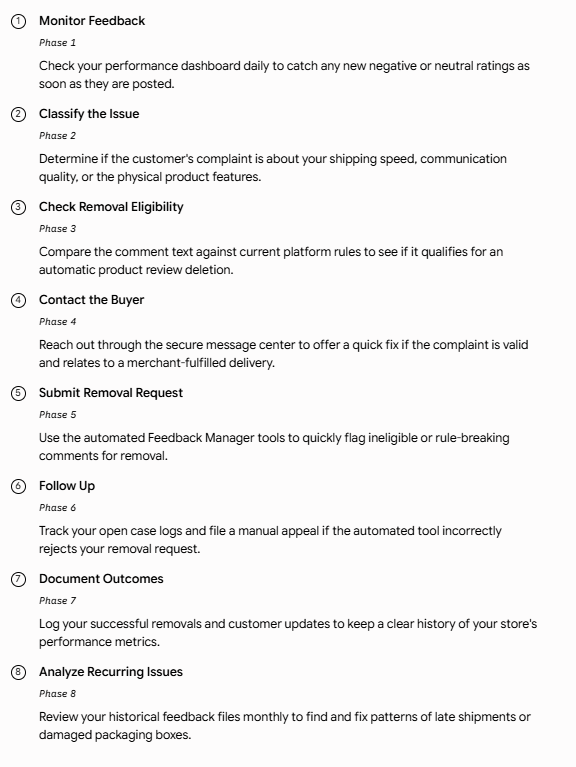
Amazon Negative Feedback Management Workflow
Managing your storefront profile requires a clear, daily system for tracking and resolving buyer complaints. A chaotic approach to customer issues can cause your team to miss key policy appeal windows. Follow this organized workflow to keep your negative ratings minimal.
Preventing Negative Seller Feedback
The most efficient way to maintain a perfect storefront rating is to optimize your logistics so customers never have a reason to complain. Building a reliable fulfillment process keeps your defect numbers low and reduces your customer service workload.
- Accurate Product Listings: Ensure your sizes, material descriptions, and dimensions match your physical inventory perfectly to prevent buyer surprises.
- Fast Shipping: Dispatch your merchant-fulfilled packages within your promised windows, or use FBA channels to guarantee fast deliveries.
- Inventory Management: Sync your warehouse management software regularly to prevent stockouts and unexpected order cancellations.
- Customer Service: Train your internal team to answer buyer questions quickly and professionally using approved communication channels.
- Returns Handling: Simplify your return and refund processes to prevent simple product returns from turning into public complaints.
- Proactive Communication: Send friendly tracking updates through the message console if an external carrier encounters unexpected delivery delays.
- Quality Control: Check your master shipping boxes regularly to ensure your products have enough padding to survive rough transit handling.
Using Automation to Manage Seller Feedback
As your e-commerce storefront grows, tracking customer messages manually becomes difficult for internal support teams. Using specialized software tools helps you monitor your ratings and respond to buyer issues in real time.
- Helpdesk Platforms: Connect all your seller accounts into a single dashboard to simplify how your team manages customer messages.
- CRM Integrations: Match incoming buyer reviews with historical customer order details to resolve issues much faster.
- AI-Generated Response Drafts: Use smart text suggestions to quickly draft polite, professional answers for common delivery issues.
- Sentiment Analysis: Use automated scanning tools to flag angry customer messages early, allowing you to prioritize high-risk issues.
- Alerts and Dashboards: Set up instant phone or email notifications to alert your managers whenever a one-star review hits your profile.
Common Mistakes to Avoid
Many brands make simple strategy mistakes that accidentally lower their merchant reputation scores. Avoiding these communication errors protects your business standing and keeps you compliant with platform policies.
- Confusing Reviews with Feedback: Wasting time writing public responses to product reviews inside your seller feedback tab instead of using the proper removal tools.
- Violating Amazon Communication Policies: Offering gifts, cash refunds, or discount codes to customers in exchange for removing negative reviews.
- Delayed Responses: Leaving bad reviews sitting on your profile for weeks without trying to fix the customer's problem or file an appeal.
- Ignoring Trends: Treating repetitive complaints about broken boxes as one-off issues instead of fixing your packaging process.
- Requesting Reviews Improperly: Sending too many follow-up messages to buyers can annoy them and trigger a negative rating.
Conclusion
Mastering Amazon Negative Feedback Management is an ongoing necessity for safeguarding your buy box visibility and keeping your account in good standing. By continuously tracking your incoming reviews, appealing rule-breaking comments, and resolving customer issues quickly, you protect your long-term marketplace growth. Setting up a reliable daily management routine keeps your public metrics clean and professional.
As your sales volume scales up, keeping your merchant profile spotless requires deep policy knowledge and fast customer service execution. Working with an expert Amazon Negative Feedback Management provider gives your team the specialized tools needed to handle complex data drops and optimize your profile metrics. Build a strong, proactive customer support foundation today to keep your brand at the top of marketplace search results.
Frequently Asked Questions
1. Can Amazon remove all negative feedback?
No, the compliance systems will only remove bad feedback that explicitly breaks their written platform rules. If a customer shares a valid complaint about late shipping on a merchant-fulfilled order, that rating will stay on your profile.
2. Can buyers edit feedback?
Yes, customers can remove or update their original storefront reviews through their personal account settings within 60 days of posting. However, you cannot use financial rewards or free products to pressure them into changing their score.
3. Does FBA feedback count against sellers?
If an order is shipped using Fulfillment by Amazon and arrives late or damaged, you can request an official strike-through review. The marketplace will leave the comment on your profile but add a line apologizing for the delivery error, which prevents it from hurting your ODR score.
4. How long does feedback remain visible?
Public store ratings stay active on your merchant profile page permanently, but your primary star ratings are calculated using your trailing 30, 90, and 365-day performance metrics. Older reviews have a much smaller impact on your modern buy box eligibility scores.
5. Can feedback be struck through?
Yes, the platform will cross out bad feedback if the transaction was handled via FBA or if the issue was caused entirely by an approved buy-shipping carrier. The struck-through review remains visible to buyers but does not hurt your official defect metrics.
6. How does negative feedback affect the Buy Box?
A sudden drop in your seller score tells the system that your fulfillment network is struggling, which can cause your buy box share to drop. If your positive rating slips below 90 percent, you may lose your featured offer spots to competing sellers entirely.
7. Can you appeal a denied removal request?
Yes, if the automated manager tool incorrectly turns down your initial deletion request, you can open a manual case file through your support menu. You must submit clear proof showing exactly how the comment breaks platform rules to have a support agent review the file.