



Amazon Seller Central Management Archives - Page 3 of 7 - Amazon Listing Service

Category: Amazon Seller Central Management

Working on Amazon Seller Central Settings: Things You Should Know!

Amazon Seller Central
  • ebook1
  • ebook4
  • ebook7

Table of Contents

Learning the Amazon Seller Central Tabs

The Home Screen

Other Major Tabs to Consider

Keeping Up-to-Date with Amazon Seller Central

Conclusion

A web-based tool called Amazon Seller Central was created to make it easier for sellers to run their businesses on Amazon. You can manage your Amazon Seller Central inventory, keep an eye on your sales success, track your orders, and communicate with clients with this all-in-one solution. You have access to some tools and features through Amazon Seller Central services that can help you increase sales and expand your business on Amazon.

Utilizing Amazon Seller Central is crucial to managing your business as an Amazon seller. Using the platform's precise analytics and insights into your sales success, you can improve your product listings and increase your revenues by making data-driven decisions. To ensure you never run out of stock, you may also utilize the Amazon Seller Central inventory services to manage your inventory, keep an eye on your stock levels, and set up automated inventory replenishment.

You may contact customers directly through the platform using Amazon Seller Central in addition to inventory control and sales data. From one central location, you can manage your customer feedback and reviews, react to customer messages, and manage returns and refunds.

Overall, the features offered by Amazon Seller Central provide you with everything you need to run your Amazon business efficiently. Amazon Seller Central is a potent tool that may assist you in achieving your objectives, regardless of whether you're just getting started or hoping to grow your company to new heights.
Working On Amazon Seller Central Settings Things You Should Know

Learning the Amazon Seller Central Tabs

In managing your business, each tab on Amazon Seller Central has a specific function.

  • Inventory tab: You may update your product listings on the Inventory tab by adding new goods, changing existing ones, and keeping track of inventory levels using Amazon Seller Central inventory management tools.
  • Orders tab: You may monitor and handle customer orders in the Orders tab, including shipping and handling, refunds, and cancellations. If you're wondering what does open orders mean on Amazon Seller Central, it refers to orders that have been placed but not yet fulfilled or shipped.
  • Advertising page: You may build and manage advertising campaigns under the Advertising page to promote your products and boost sales.
  • Reports tab: The Reports tab offers insightful information and valuable data about your marketing efforts, client satisfaction, and sales performance.
  • Performance tab: You can check the status of your account and confirm that you are performing according to Amazon's requirements using the Performance tab.
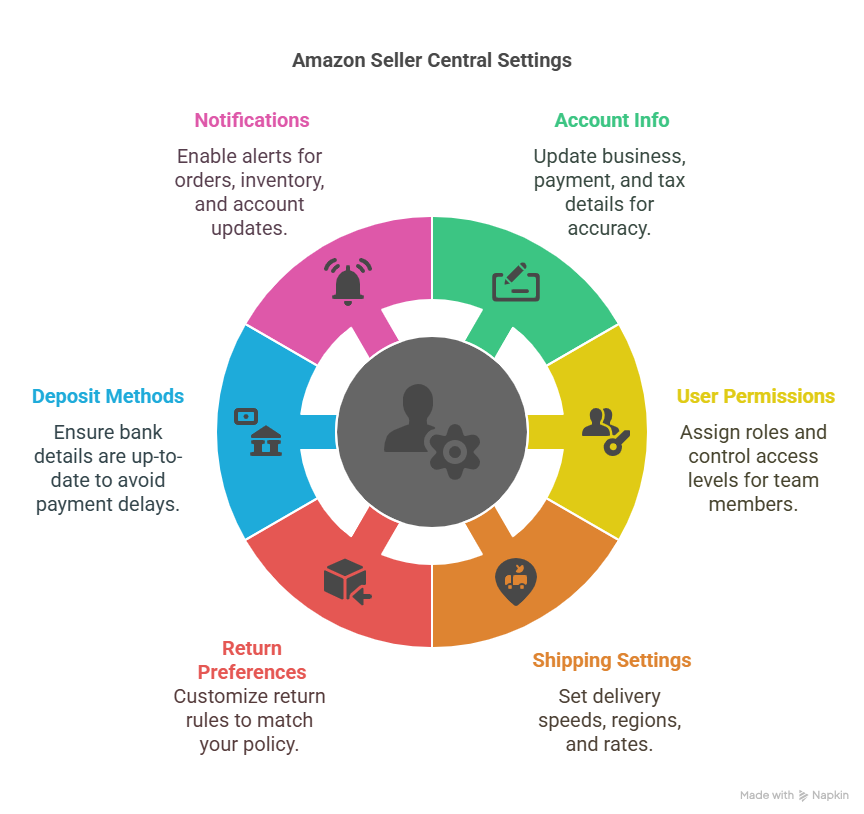
  • Settings tab: You may manage your account information, including payment and billing information, shipping preferences, and user rights, on the Settings tab.

Using these tabs on Amazon Seller Central, you can efficiently manage your company and monitor your sales, inventory, and customer interactions. It's crucial to frequently examine these tabs and take advantage of them to ensure your business functions properly.

The Home Screen

One of the most crucial tabs for Amazon sellers is the Home screen on Amazon Seller Central. It gives you a brief overview of your accounts and your sales performance.

  • Market Places: Amazon.com, Amazon.ca, and Amazon.co.uk are just a few examples of the marketplaces listed in the Marketplaces section. From this section, you can access each marketplace with ease.
  • Open orders: Any orders that have not been fulfilled will be seen in this option. What does open orders mean on Amazon Seller Central? It means unfulfilled orders those pending shipment by you or Amazon.
  • Today's Sales: Another essential element on the Home screen is Today's Sales. It displays your daily revenue and sales, vital data for monitoring your progress toward your sales objectives. By choosing a specific date range, you may also see your sales performance over some time.
  • Buyer Messages: Your buyer messages are also shown on the home screen. You can use this functionality to view and reply to buyer messages right from your Home screen. It's critical to respond to consumer messages right away to maintain vital customer service, which can ultimately result in favorable evaluations and higher sales.
  • Total Balance: Last but not least, the Total Balance column on the Home screen shows your account's current balance. You must know this information to manage your funds and prevent any negative balances. It's crucial to monitor your overall balance and ensure you have enough money to pay any essential bills, such as refunds or shipping fees.
  • Inventory Performance Index (IPI): Inventory Performance Index (IPI), a metric provided by the Inventory Amazon Seller Central inventory services, assesses a seller's inventory management effectiveness. Higher IPI scores, which range from 0 to 1000, indicate better inventory management. It is a crucial element that establishes your eligibility for services and programs like waivers of storage fees and the capacity to develop new offers during periods of high sales.

Other Major Tabs to Consider

  • Catalog>Add Products: This option is used for adding a product that's not sold on Amazon. When you're building our brand or making our products, we get started here and list it here. You can choose the product type or category and then make the listing.
  • Inventory>Manage Inventory: Under this option is where you can see all your products and the price points of our products. You can edit your products here by uploading and managing product images and videos.
  • Inventory>Manage FBA Shipments: You can track the shipments that you have sent to Amazon here. Details like units received and expected can be seen here. Amazon will reimburse you for the damaged products during shipment if you report the issue immediately to them.
  • Orders>Manage Orders: You can see the orders, the price of your items, customer information, the shipping date and address, and more details about the order under this option. You can also request a review from Amazon for any order from this option.
  • Advertising>Promotions: This option is great to use while doing off-Amazon promotions. It's a great tool to bring people to Amazon by giving OFF or PROMO codes on the checkout page.
  • Settings>Account Info: Account info is the crucial information on your account. Payment information and deposit methods are factors that you should be cautious about in this option. All your business, shipping, and return information will be available here.

Keeping Up-to-Date with Amazon Seller Central

To operate your business successfully as an Amazon seller, keeping up with changes and upgrades on Amazon Seller Central is essential. Several resources are available through Amazon Seller Central services to stay current.

  • Email Alerts: To begin with, you can configure email alerts to receive notifications of significant updates and changes. You may keep updated without constantly checking the platform with the aid of these customizable notifications.
  • Seller Forum: There is a seller forum on Amazon Seller Central where you may talk to other merchants and obtain information on many subjects. The platform is a fantastic resource for finding out about typical problems and their fixes, as well as gaining suggestions from seasoned sellers.
  • Amazon Seller App: Another helpful resource for remaining current is the Amazon Seller App. You can use the app to manage your company while moving and get real-time notifications on your sales, inventory, and customer interactions. Even when you are not in front of your computer, it is a practical approach to staying in touch with your company.

Optimizing your business following platform changes and remaining informed about them is critical. Sponsored Products and Amazon Advertising are only two of the tools and resources offered by Amazon Seller Central services to assist you in optimizing your business. You may enhance your sales and visibility on the platform with these tools.

You can remain ahead of the competition and successfully manage your business on Amazon Seller Central by staying current and adjusting.

Conclusion

You can effectively manage your inventory, keep track of your sales and revenue, and deliver first-rate customer support by utilizing the tools and capabilities offered by Amazon Seller Central. You can also prevent extra expenses and fees by keeping a strong IPI, which can significantly influence your bottom line.

Lastly, you may optimize your Amazon business and become a successful seller by becoming familiar with the tabs on Amazon Seller Central, paying attention to the Home screen, maintaining a solid IPI, and staying current with the platform.

Utilize Vserve's Amazon Seller Central inventory service to have total control over product listings and inventory shipments. Upgrade your products' rankings right now.

This Blog is inspired by the video: "Complete Amazon Seller Central Tutorial (Don't Touch These Settings!)" by "Camron James."

Unveiling the Powerhouses: Helium 10 vs. Jungle Scout for Amazon Sellers

Amazon Management Services
  • ebook1
  • ebook4
  • ebook7

For competitive Amazon selling, wielding the right tools can be the best way to stay ahead of the curve in a competitive landscape. Today, we're diving deep into comparing two industry giants: Helium 10 and Jungle Scout Amazon. These tools act as your armor, ensuring you stay caught up by your FBA (Fulfillment by Amazon) competitors. Amazon store management software has now come down to a two-horse race: Helium 10 and Jungle Scout.

Table of Contents

Comparison Between Helium 10 vs. Jungle Scout

I. Pricing: The Cost Dilemma

II. Accuracy of Revenue Estimates

III. Keyword Research Accuracy

IV. Features: A Collection of Tools

Conclusion

Comparison Between Helium 10 vs. Jungle Scout

Jungle Scout Amazon and Helium 10 share significant Amazon store management feature overlaps. However, juxtaposing them side by side can be bewildering due to their distinct packaging. Moreover, although insightful, Helium 10's unconventional naming conventions—Cerebro, Frankenstein, Scribbles, Black Box, Misspellinator—can initially leave you scratching your head.

The comparison of Jungle Scout and Helium 10 revolves around several crucial criteria:

I. Pricing: The Cost Dilemma

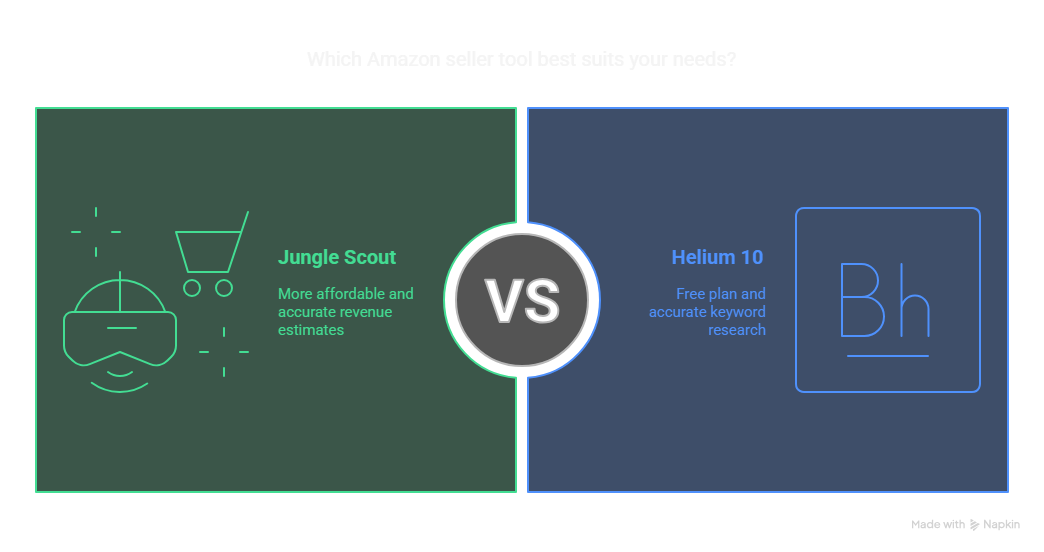
In terms of affordability, Jungle Scout takes the lead over Helium 10. A noteworthy twist in the tale is Helium 10's offering of a free plan, which Jungle Scout lacks. Helium 10's free plan provides a tantalizing glimpse into its Amazon store management features through a sample set. Both tools follow a fixed monthly fee model, regardless of the revenue generated. They are a valuable insight for sellers with a tight omnichannel Amazon budget.

However, for serious Amazon sellers pursuing an Amazon omnichannel strategy, both platforms recommend advancing to their higher-tier plans—Jungle Scout's Sweet Plan or Helium 10's Platinum Plan. While entry-level plans provide a taste of functionalities, their usage caps render them inadequate for omnichannel operations. Though robust, Helium 10's Platinum Plan commands a fee of $97/month, while Jungle Scout's counterpart stands at a more budget-friendly $69/month. Despite Helium 10’s free plan, Jungle Scout's affordability remains a distinguishing factor, making it a smart option for those executing Amazon omni channel strategies on a budget.

II. Accuracy of Revenue Estimates

Accuracy in revenue estimates becomes pivotal when structuring omni-channel logistics on Amazon. Here, Jungle Scout edges out Helium 10. This assertion is supported by real data from over 50 Amazon products. Both platforms estimate a product's 30-day trailing revenue on Amazon.

Helium 10's X-Ray tool, via its Chrome extension, offers metrics like sales revenue, fees, and review count. On the other hand, Jungle Scout mirrors this via its extension but with greater precision. While both tools may slightly inflate figures, Jungle Scout's revenue projections are generally more accurate. This is vital for building omni retailers' strategies in sync with real-world performance data.

Unveiling The Powerhouses Helium 10 Vs Jungle Scout For Amazon Sellers

III. Keyword Research Accuracy

Exact keyword volume data for Amazon's A9 search engine isn't publicly disclosed. Therefore, Amazon enhanced brand content creators must approach keyword volume figures from Helium 10 and Jungle Scout with cautious optimism. Nevertheless, Amazon Brand Analytics arms brand-registered sellers with invaluable data—search terms, buyer demographics, and more—essential to an omnichannel Amazon approach.

A meticulous comparison ensures the alignment of search volumes with expectations in both Amazon store management tools. Typically, one would anticipate a descending search volume trend for lower-ranked keywords. Regarding keyword research, Helium 10's tool emerges as the victor regarding accuracy. Its tools align more closely with omni-channel content trends, making it a preferred choice for those developing Amazon enhanced brand content as part of a broader Amazon omnichannel strategy.

IV. Features: A Collection of Tools

Jungle Scout Amazon and Helium 10 are renowned for offering an expansive suite of features designed to support Amazon store management at every stage. Whether you're seeking new product ideas or navigating omni-channel logistics Amazon needs, these tools deliver operational value. Let's explore their shared core functionalities and platform-specific advantages in detail.

1. Finding New Product Ideas

One of the fundamental steps in the Amazon omnichannel strategy is discovering winning product ideas before the competition does. Both tools offer powerful research features in this arena. Helium 10’s Black Box helps identify high-performing product ideas using filters such as minimum revenue of $2,000/month, under 200 reviews, and price thresholds of $20 or more.

On the flip side, Jungle Scout Amazon software features the Opportunity Finder, which reveals keywords associated with products that sell 300+ units monthly, carry a search volume of over 1,000, and are priced competitively at $20 or more. For omni retailers, these insights provide a strategic advantage when diversifying inventory across platforms. Both tools reduce guesswork by empowering you with data-backed product research, a key component in executing any scalable omnichannel Amazon sales model.

2. Optimize Listings

Once the product is selected, crafting a compelling listing with strong Amazon enhanced brand content becomes vital. Jungle Scout simplifies the process with a user-friendly listing builder available within its web app, guiding sellers through optimized copy creation. Meanwhile, Helium 10's Scribbles tool assists in integrating high-volume keywords effectively, streamlining backend optimization.

Both platforms support keyword rank tracking over time, ensuring that your listings remain visible as trends evolve. Do an Amazon omnichannel case study, and you will realize that maintaining SEO-optimized listings across platforms isn’t just helpful—it’s essential. These optimization features not only support Amazon but can also be adapted to strengthen listings on external channels, aligning with a wider Amazon omni channel strategy.

3. Profit and Loss Dashboards

Profitability is more than gross revenue—it's about knowing what is your financial health. Both Jungle Scout and Helium 10 provide robust profit and loss dashboards designed to offer sellers a comprehensive view of their finances. From Amazon seller fees to ad spend and returns, the dashboards break down everything affecting your margins.

This kind of insight is crucial for sellers managing complex operations across multiple platforms. For the omni-channel logistics Amazon provides, sellers must juggle varying costs, and these dashboards bring clarity to that complexity. They enable better forecasting, improve budgeting accuracy, and are an indispensable resource for omnichannel Amazon brands trying to scale responsibly.

4. Garnering Reviews and Alerts

Managing customer feedback is another cornerstone of long-term success in Amazon store management. Both Helium 10 and Jungle Scout provide tools that allow sellers to monitor and manage reviews, while also offering real-time listing alerts. If there's a change in your product's Best Seller Rank (BSR), listing content, or if a negative review is posted, you’ll know about it immediately.

This level of control enables sellers to take swift action, which is particularly important in maintaining brand equity across multiple touchpoints—an expectation in today’s omni retailers’ landscape. The ability to set performance thresholds and receive updates gives Amazon sellers a competitive edge when striving for a seamless and responsive Amazon omnichannel experience.

5. Inventory Management and Product Tracking

Inventory mismanagement can lead to costly mistakes—stockouts hurt rankings, while overstocking leads to unnecessary storage fees. Fortunately, both tools offer intelligent inventory management solutions. Jungle Scout and Helium 10 feature predictive inventory models that suggest when to reorder based on sales velocity, seasonality, and lead time.

Product tracking tools provide insights into how listings are performing across different timeframes. These tools are invaluable when building an Amazon omni channel ecosystem, allowing sellers to make informed decisions about where and when to push inventory. Whether you’re launching a product exclusively on Amazon or synchronizing stock across several sales channels, these platforms serve as powerful forecasting companions within any omni-channel logistics Amazon framework.

6. Jungle Scout's Supplier Database

This is where Jungle Scout Amazon separates itself from the pack. Its Supplier Database allows users to research suppliers by product type or brand and gives access to shipment data sourced from U.S. customs records. This includes container contents, frequency of shipments, and supplier contact details. The Supplier Database is a goldmine for sellers looking to identify vetted manufacturers or understand their competition’s sourcing strategy.

In an omnichannel Amazon world, your supply chain must be just as agile and informed as your marketing. This Amazon store management tool provides transparency that directly supports supply chain optimization and is a differentiator for omni retailers managing a diverse catalog of private-label goods. It’s the type of feature you’d expect to see highlighted in any robust Amazon omnichannel case study.

7. Notable Helium 10 Features: A Toolbox of Distinctive Tools

Helium 10 brings to the table several features that Jungle Scout Amazon does not yet offer. The Misspelling Eraser, for instance, identifies common customer misspellings for backend keyword optimization—perfect for refining Amazon enhanced brand content. Their Review Downloader helps analyze customer sentiment quickly by pulling review data across ASINs.

Their mobile app, equipped with real-time stats and tracking, is a major plus for on-the-go sellers operating under an Amazon omnichannel model. Additionally, Helium 10 integrates a profitability calculator within its Chrome extension and provides a feature called Refund Genie—designed to streamline FBA reimbursement claims by automatically detecting eligible cases, generating messages, and estimating potential refunds.

For sellers managing large SKU portfolios and multiple sales channels, Refund Genie saves hours of administrative time and helps recover overlooked revenue—making it an essential part of Amazon store management and a solid tool within any omnichannel Amazon strategy.

Conclusion

While Helium 10's Platinum Plan may provide more features, Jungle Scout's Supplier Database delivers unmatched strategic insight for Amazon omnichannel strategy leaders. In the end, your decision depends on your goals—whether optimizing Amazon enhanced brand content, scaling via omni-channel logistics Amazon, or launching new SKUs under an omnichannel Amazon strategy.

If you're seeking Amazon marketplace management services, look no further than Vserve Amazon Listing Services. With proven expertise in Amazon store management, they can help optimize your listings, enhance visibility, and elevate your omnichannel presence. Whether you're a solo seller or part of a growing team of omni retailers, Vserve ALS offers effective support tailored to your goals.

Inspired by the video The Best Amazon Seller Tool (For The Money) - Helium 10 Vs Jungle Scout by MyWifeQuitHerJob Ecommerce Channel.

Which AI Tools for FBA Are Sellers Using to Automate and Outsell the Competition

Ai Fba

If you’re an Amazon FBA seller, you’ve probably noticed how competitive the game has become. The sellers who are winning? They’re not working harder—they’re working smarter. And more often than not, they’re using AI tools built for Amazon sellers to do it.

Lately, I’ve been exploring this shift—how generative AI for content creation and automation tools are saving time, cutting costs, and helping sellers outsell the competition. This topic is exploding—searches for AI tools for FBA sellers and AI Amazon sellers are up over 780%, with more than 660,000 people trying to figure out which tools actually work.

In this blog, I’m walking through the most useful tools for Amazon sellers today, including how to use them wisely and where the human touch still matters.

Table of Contents

The Rise of AI for Amazon Sellers

The Best AI Tools for FBA Sellers in 2025

Real Example: Scaling with AI and Human Support

Where Sellers Go Wrong with AI

Frequently Asked Questions (FAQs)

Key Takeaways

The Rise of AI for Amazon Sellers

There’s a growing demand for automation in the ecommerce marketplace world. From writing listings to analyzing keywords, sellers are turning to AI tools to simplify their workload.

Why? Because AI can now:

  • Scan the Amazon marketplace online shopping trends in real time
  • Act as an Amazon niche product finder
  • Speed up generative AI content creation for listings
  • Help you create smart campaigns and listings with just a few clicks

But while these tools for Amazon sellers are impressive, they still need human input to be effective. That’s why I always recommend a hybrid approach: let AI do the heavy lifting, but rely on people to make it perform.

Which Ai Tools For Fba Are Sellers Using To Automate And Outsell The Competition

The Best AI Tools for FBA Sellers in 2025

Let’s break down the AI tools that are helping sellers not just automate—but actually outsell.

1. Helium 10 (AI-Powered Amazon Product Finder and Research Tool)

Helium 10 is one of the most powerful AI tools for Amazon sellers out there. It’s packed with features—from keyword trackers to listing builders—and now includes AI-generated optimization suggestions too.

Here’s what it does well:

  • Finds hidden opportunities in your niche
  • Uses AI to create keyword-rich listings
  • Audits your product pages based on Amazon’s best practices

We had a client who relied on Helium 10 as their main amazon product finder and research tool. After our team edited the AI-generated content, they saw a 19% boost in keyword rankings and a clearer product message that led to more conversions.

2. ZonGuru’s Niche Hunter + AI Analysis

If you’re looking for tools for Amazon sellers focused on niche discovery, ZonGuru’s Niche Finder is incredibly effective. It uses predictive AI to score opportunities based on demand, competition, and profitability.

It doesn’t just pull data—it makes suggestions, like a real assistant. But here’s the catch: it’s still up to you (or your support team) to evaluate whether the niche aligns with your product goals and long-term strategy.

3. ChatGPT (Used Carefully for Generative AI Content Creation)

Yes, sellers are using generative AI for content creation—especially ChatGPT—to draft bullet points, titles, and FAQs. It’s fast and flexible, but not always accurate.

One seller we worked with used ChatGPT to rewrite 100 listings. But because they skipped the human review, their Amazon AI products sounded cold, repetitive, and even a bit off-brand. We rewrote everything and saw a 20% rebound in conversion rate.

This proves that AI product content only works when it’s fine-tuned by someone who understands tone, branding, and platform rules.

4. Scale Insights (AI for Amazon Sellers Focused on PPC)

Amazon ads can burn your budget fast if you’re not careful. That’s why many sellers use AI tools for FBA like Scale Insights—it automates bid changes based on performance data.

It:

  • Monitors ad performance in real time
  • Automatically reallocates budgets to winning campaigns
  • Helps reduce manual oversight on daily bids
  • We recommend checking in weekly, though—since even the smartest amazon tools for sellers can miss seasonal surges or new competitor activity.

5. Jungle Scout with AI Tools for Listing Writing

While Jungle Scout has long been a favorite Amazon product research tool, their new AI-based features for content creation are gaining traction. It can draft full listings, titles, and bullet points with keyword suggestions.

It’s ideal for busy sellers—but the generated text often lacks emotional appeal. That’s where human editors (like our team) make the difference. The best-performing listings still have personality, not just data.

Real Example: Scaling with AI and Human Support

We helped a skincare brand managing an Ecommerce Marketplace Integration project. They wanted to roll out new listings across Amazon, Shopify, and Walmart.

Here’s how we used AI:

  1. Helium 10 helped us spot under-optimized SKUs.
  2. ChatGPT gave us a fast first draft of product descriptions.
  3. Scale Insights adjusted their ad bids in real-time.
  4. Our human team reviewed every word, ensured brand alignment, and manually applied platform-specific formatting.

The result?

  • 31% faster launch speed
  • 25% increase in customer engagement
  • 18% drop in return rate due to clearer descriptions

That’s the balance: let AI do the fast work, but let people ensure it works well.

Where Sellers Go Wrong with AI

AI tools are powerful, but they’re not magic. Here are the most common mistakes we see sellers make:

  • Publishing AI content without editing
    Using the same listing across multiple products
  • Ignoring Amazon’s compliance and formatting guidelines
  • Letting automated tools run without supervision

The best AI Amazon sellers know this: AI is a tool, not a strategy.

Which Ai Tools For Fba Are Sellers Using To Automate And Outsell The Competition

Frequently Asked Questions (FAQs)

1. Is there one AI tool that does everything for Amazon sellers?

Not really. Most sellers use a mix—like Helium 10 for research, ChatGPT for content drafts, and Scale Insights for ads.

2. Do AI listings perform better than human-written ones?

Only when reviewed and edited by people. Unedited AI copy often misses emotional cues or brand tone.

3. Can AI tools replace manual research for finding winning products?

They help you narrow options, but manual checks are still needed to validate demand, competition, and feasibility.

4. Are AI tools worth the subscription cost?

Yes—if you actually use them and pair them with a solid content strategy. Tools don’t work if they sit idle.

5. What’s the best way to use AI in Amazon FBA?

Start with automation, but always customize and test with real data. Think of AI as a first draft, not the final say.

Key Takeaways

The top AI tools for FBA sellers can streamline product research, listing creation, and ad management—but human input still drives performance. The winning strategy blends fast tools with smart editing.

Here are three quick takeaways:

  1. Combine AI with human strategy for best results 2. Use AI to save time, not skip critical thinking 3. Test, tweak, and don’t go “set it and forget it”

We’ve explored how sellers are using AI—from amazon niche product finders to generative AI for content creation—and why it’s still smart to have human help at every stage.

Want to share your experience? Drop a comment below, or talk to our team at Amazon Listing Services to explore how we support Amazon sellers with a mix of smart tools and smarter humans.

Stay connected with us on Facebook, Instagram, and LinkedIn for more FBA insights and updates.

How a Seller Central Virtual Assistant Helps You Navigate Confusing Amazon Policy Updates

Amazon Seller Virtual Assistant

As an Amazon seller, nothing causes more confusion (and sometimes panic) than a sudden policy update from Amazon. One day, your listings are performing well. The next? You’re hit with a compliance warning, your best-seller is suppressed, and you’re stuck figuring out what went wrong.

Amazon doesn't take a break for anyone—and its rules are frequently shrouded in mystery, laced with legalese, and hidden deep within Seller Central alerts. So how do you stay in the know? That's where a Seller Central virtual assistant comes in. They're not merely task masters—they're your first line of defense against Amazon's ever-changing rulebook.

In this post, I'll detail how a Seller Central VA keeps you compliant, avoids account suspensions, and keeps your listings active—even when Amazon continues to move the goalposts.

Table of Contents

Why Amazon Policy Updates Are So Confusing

So, How Does a Seller Central Virtual Assistant Help You Navigate This?

Real Example: A VA Saved a Seller from Suspension

What Else Can a Seller Central VA Help With?

What About AI Assistants—Can They Handle This?

Frequently Asked Questions (FAQs)

Key Takeaways

Why Amazon Policy Updates Are So Confusing

Amazon frequently changes its policies—sometimes without clear notice. These changes affect everything from product listings and category restrictions to returns, Amazon PPC, and customer communication.

Here’s why staying on top of these updates is hard:

  • Policy titles like “Important Update: FBA Policy Change” lack context
  • Full documentation is dense, full of technical language, and time-consuming
  • Sellers must adjust quickly—or face policy violations
  • Rules differ by product category, fulfillment method, and region

According to Amazon’s public policy documents and third-party sources, Amazon updates its policies more than 100 times per year, which is nearly two changes per week.

If you miss even one of these updates, you risk:

  • Listing suppression
  • Performance notifications
  • Account suspension

That’s why Amazon virtual assistant services have become essential.

How A Seller Central Virtual Assistant Helps You Navigate Confusing Amazon Policy Updates

So, How Does a Seller Central Virtual Assistant Help You Navigate This?

A Seller Central virtual assistant is trained to manage your Amazon account, stay ahead of policy changes, and ensure your store remains compliant. Here’s how:

1. They Monitor Amazon Policy Updates Daily

Your Amazon seller virtual assistant logs into Seller Central every day—not just for orders and messages but to watch for updates and compliance notices.

What they do:

  • Review the “News” and “Performance Notifications” sections daily
  • Read Amazon’s official seller emails and policy bulletins
  • Track FBA policy changes and category-specific rules

They don't just read them—they understand them. Your VA will interpret the updates, identify what applies to your store, and recommend immediate steps.

2. They Audit Listings for Compliance

When Amazon changes requirements (like new pesticide disclaimers or character limits in titles), your VA reviews all your active listings to ensure nothing is at risk.

They’ll check:

  • Product title formatting and keyword use
  • Description and bullet points for compliance
  • Images against updated Amazon guidelines
  • Backend listing details for hidden risks

Your Amazon FBA virtual assistant can act fast—removing risky language and submitting edits before Amazon penalizes you.

3. They Handle Compliance Tasks for You

When updates require action, your Amazon seller central virtual assistant gets it done—no delay, no confusion.

Tasks include:

  • Uploading safety data sheets (SDS) or compliance docs
  • Requesting reinstatement for suspended ASINs
  • Updating FBA prep and packaging details
  • Responding to “Action Required” messages within 24 hours

This is where human support beats AI tools. While AI administrative assistants and AI task automation can send reminders or create summaries, they won’t log in, make real-time changes, or chat with Seller Support on your behalf.

4. They Prepare You for Upcoming Changes

A good Amazon seller virtual assistant doesn’t just react—they anticipate.

Because they’re part of seller groups, read the forums, and stay plugged into updates, they’ll warn you before a policy affects your store.

For example:

  • If FBA restock limits change, your VA adjusts your shipping plans
  • If certain keywords are being restricted, they begin cleaning up listings
  • If return rules shift, your VA updates messaging on product pages

This kind of proactive help is what makes Amazon virtual assistant services so valuable—especially when Amazon doesn’t spell everything out clearly.

Real Example: A VA Saved a Seller from Suspension

One of our clients sells skincare products on Amazon. She missed a policy update requiring specific labeling for topical items. Her product was flagged, and she had 72 hours to submit documents or face a suspension.

She never saw the notice—but her Amazon seller central virtual assistant did.

What the VA did:

  • Pulled the right ingredient documents
  • Uploaded them to Seller Central within the required tab
  • Created a case with Seller Support
  • Updated the listing with compliant usage instructions

As a result, the listing stayed live, and the account remained in good standing. No AI assistant could’ve done that.

What Else Can a Seller Central VA Help With?

Besides policy monitoring, your VA can support daily business operations:

  • Order and refund processing
  • Responding to customer messages within 24 hours
  • Running keyword audits and updating listings
  • Competitor research and tracking
  • Ad campaign monitoring (as your Amazon PPC virtual assistant)
  • Creating reports for performance metrics

You get a full-time support system—not just a policy watchdog.

What About AI Assistants—Can They Handle This?

Some sellers turn to AI assistant tools, chatbots, or AI virtual assistant platforms to manage their stores. These tools offer value but have limitations.

AI can:

  • Summarize announcements
  • Flag policy issues using templates
  • Automate simple reports

AI cannot:

  • Interpret complex or vague policies
  • Talk to Seller Support
  • Understand unique product compliance
  • Strategize how to reinstate a suspended ASIN

While tools like AI customer service assistants, AI business assistants, and AI-based virtual assistants can support small tasks, only a trained human VA understands the full Amazon ecosystem.

How A Seller Central Virtual Assistant Helps You Navigate Confusing Amazon Policy Updates

Frequently Asked Questions (FAQs)

1. Do Seller Central VAs know about updates before sellers?

Not in advance—but they monitor updates daily and respond faster than most busy sellers can manage on their own.

2. Can a VA prevent account suspensions?

While no one can guarantee 100% prevention, a trained VA spots red flags early and takes action to reduce the risk.

3. Do I need separate VAs for different tasks?

Not necessarily. Most skilled Amazon virtual assistants are cross-trained in FBA, PPC, compliance, and daily operations.

Key Takeaways

In concluding our examination of how a Seller Central virtual assistant assists you in navigating ambiguous Amazon policy changes, it's evident that having expert, focused assistance is essential to staying compliant and account healthy in an ever-evolving landscape. Here are three key takeaways:

  • Stay Ahead of Change: A Seller Central VA proactively tracks and translates Amazon's constant policy changes, keeping your listings compliant before problems occur.
  • Guard Your Store: With their expert expertise, VAs take care of compliance work, keep documents in order, and avoid account interruptions—so you don't have to.
  • Outsmart the Algorithms: While AI tools help with notifications, only a human VA can comprehend policy subtlety and implement strategic, real-time solutions specific to your business.

We've discussed how the proper VA can make your Amazon business run smoothly, securely, and at scale—even when the rules continue to change. To keep the discussion going or find out how we assist sellers like you, leave your experiences in the comments.

For additional insights and the newest trends in Amazon compliance and support, don't forget to subscribe to Amazon listing services on our social media handles: Facebook, Instagram, and LinkedIn. Stay tuned as we assist you in selling smarter and worry-free.

Amazon Seller Central Virtual Assistant: Automate Listings, Orders & Customer Support

Amazon Seller

Managing an Amazon business can become overwhelming in a hurry, particularly when it comes to navigating your Amazon Seller Central account. Between optimizing product listings, addressing customer support, and monitoring inventory, there is always something that needs to be managed. That is where Amazon Seller Central virtual assistant services can help.

As a person who's been in the business of ecommerce and experienced firsthand how time-consuming the backend of an Amazon store can be, I can without hesitation say that being able to hire a virtual assistant can be a game-changer. These virtual assistants (VAs) are highly trained professionals who are experts at things like product listing optimization, order management, customer service, and even Amazon PPC campaigns. By outsourcing these tasks to an Amazon virtual assistant, sellers can save time, reduce operational costs, and improve overall business efficiency.

In this blog, we’ll dive into how Amazon virtual assistants can automate routine tasks, improve customer experiences, and help drive long-term success.

Table of Contents

What Are Amazon Virtual Assistant Services, and How Do They Benefit Sellers?

How Does an Amazon FBA Virtual Assistant Help Manage Your Business?

What Tasks Can You Delegate to an Amazon Virtual Assistant to Increase Efficiency?

How Can Hiring an Amazon Virtual Assistant Streamline Your Seller Central Operations?

What Are the Benefits of Hiring an Amazon Seller Virtual Assistant for Listing Management?

How Do Amazon Seller Central Virtual Assistants Improve Order Management and Customer Support?

What Should You Look for When Hiring an Amazon Virtual Assistant for PPC Management?

How Can an Amazon FBA Virtual Assistant Optimize Your Inventory and Product Listings?

What Tasks Can an Amazon PPC Virtual Assistant Handle to Improve Ad Performance?

How Does Hiring a Virtual Assistant for Amazon Seller Central Help Save Time and Reduce Costs?

Frequently Asked Questions (FAQs)

Key Takeaways

What Are Amazon Virtual Assistant Services, and How Do They Benefit Sellers?

An Amazon virtual assistant service is truly an outsourcing platform centered on the essential administrative jobs related to managing an Amazon company. These responsibilities could be as routine as stocking inventories optimizing listings for products, receiving orders, replying to buyer questions, and so many other things.

Benefits of Amazon VAs for Sellers:

  • Conserves Time: With the elimination of mundane procedures through delegation, sellers can use this time more wisely on important development instead of remaining stuck with the day-to-day operations.
  • Affordable: Rather than employing full-time staff, VAs are an affordable and flexible alternative.
  • Scaleable Solutions: As your company expands, a virtual assistant is able to accommodate your growing requirements.

According to a study conducted by Forbes on outsourcing, companies that utilized virtual assistants reported increased productivity by 25%-30% and achieved considerable cost reductions.

Amazon Seller Central Virtual Assistant Automate Listings Orders Amp Customer Support

How Does an Amazon FBA Virtual Assistant Help Manage Your Business?

With FBA, inventory and order management can be a nightmare. That's where an Amazon FBA virtual assistant comes in. They can monitor inventory, handle shipments, and even monitor stock levels, keeping your business up and running.

Things an FBA VA Can Do:

  • Inventory Management: Maintains accurate inventory levels and synchronizes FBA inventory with your Amazon Seller account.
  • Order Fulfillment: Monitoring shipments, FBA return handling, and fulfilling customer orders in a hassle-free manner.
  • Restocking Alerts: Alerts you to restock products when the quantities are running low.

In an article from Entrepreneur.com, about outsourcing logistics using Amazon FBA virtual assistants, it was mentioned that such companies experienced 40% lower stockouts along with better availability of products.

What Tasks Can You Delegate to an Amazon Virtual Assistant to Increase Efficiency?

When operating an Amazon store, time equals money, and doing everything yourself can be exhausting. The good news is that there are many tasks that an Amazon seller virtual assistant can remove from your plate.

Tasks You Can Delegate:

  • Listing Optimization: Write SEO-friendly product titles, bullet points, descriptions, and keywords.
  • Customer Support: Answer customer questions, process returns, and maintain positive reviews.
  • Order Management: Make sure orders are shipped and monitor returns for hassle-free service.
  • PPC Campaigns: Launch Amazon Ads, track ad spending, and optimize campaigns to achieve the best ROI.

According to a study conducted by Business News Daily, sellers who utilized virtual assistants for order management and product listing reported 20%-30% sales growth.

Amazon Seller Central Virtual Assistant Automate Listings Orders Amp Customer Support

How Can Hiring an Amazon Virtual Assistant Streamline Your Seller Central Operations?

Amazon Seller Central can soon turn into a complicated system with its inventory, orders, and customer inquiries. Having a virtual assistant for Amazon Seller Central can organize these functions and make sure everything goes smoothly.

How a Virtual Assistant Can Help:

  • Centralized Task Management: A VA can handle all the things of Seller Central, making sure there are correct stock levels, dealing with customer complaints, and monitoring sales data.
  • Automated Reports: The VA can provide frequent reports on the performance of sales, inventory, and ad campaigns.
  • Time Savings: Rather than doing listings, orders, and customer problems manually, an assistant can take care of a lot of it.

Statista states that companies that utilize virtual assistants get up to 40% time savings on repetitive management tasks.

What Are the Benefits of Hiring an Amazon Seller Virtual Assistant for Listing Management?

Your product listings are the foundation of your Amazon business, and optimizing them can have a direct effect on sales and visibility. Having a virtual assistant handle and optimize these listings can greatly enhance conversion rates.

Advantages of Virtual Assistant-Driven Listing Management:

  • SEO Optimization: VAs make sure your listings are optimized for Amazon's search algorithm, enhancing visibility.
  • A/B Testing: They are able to test product titles, images, and descriptions to discover the optimal mix for increased clicks and conversions.
  • Updated Pricing and Inventory: The VA is able to track stock levels and price and make automatic adjustments as required.

Optimized Amazon listings mean almost a 30% lift in clicks and a 15% boost in conversion rates, according to Search Engine Journal.

How Do Amazon Seller Central Virtual Assistants Improve Order Management and Customer Support?

Order fulfillment and customer support are essential parts of any eCommerce company. Amazon Seller Central virtual assistants can enhance both by making sure that your customers' orders are processed in a timely manner and their questions answered effectively.

Major Improvements with a Virtual Assistant:

  • Smooth Order Processing: The VA can manage orders and returns, providing a seamless experience to the seller as well as the customer.
  • Timely Customer Replies: Virtual assistants can reply to product queries, resolve problems, and make sure customers are satisfied with their interaction.
  • Reviews and Feedback Management: Keeping your store with positive customer reviews and feedback is crucial. The VA can reply to messages and reviews on your behalf.

As per Business News Daily, companies that outsourced customer service to a virtual assistant had 50% quicker response times and 10% better reviews.

Amazon Seller Central Virtual Assistant Automate Listings Orders Amp Customer Support

What Should You Look for When Hiring an Amazon Virtual Assistant for PPC Management?

Amazon PPC (Pay-Per-Click) is a great tool, but one that needs continuous monitoring and optimizing to produce results. Employing a virtual assistant for Amazon PPC can save you time and money by having your campaigns optimized to perform at the best. Key Factors to Consider:

  • Experience with Amazon Ads A VA who has experience in PPC and understanding of Amazon's ad system is what you are looking for.
  • Analytical SkillsThe VA ought to be capable of examining ad campaigns and making recommendations for improvement.
  • Budget ManagementThey should be able to optimize ROI without letting ad spend get out of hand.

According to Marketing Land, companies using Amazon PPC managers see an average 20%-30% ad profitability increase following campaign optimization.

How Can an Amazon FBA Virtual Assistant Optimize Your Inventory and Product Listings?

Listing optimization and inventory management go together. An FBA virtual assistant can remove the headache of tracking stock and updating listings.

How an FBA Virtual Assistant Assists:

  • Inventory Updates: Keeps your FBA inventory current and restocked when the stock is about to run out.
  • Listing Adjustments: The assistant can change prices, product descriptions, and keywords in accordance with market demands and trends.
  • Enhancing Product Visibility: By making your product listings SEO-friendly, the VA enhances visibility and search rankings.

According to Statista, companies that utilize virtual assistants for inventory management experience 25%-35% stock turnover improvements and 10%-15% sales increases.

What Tasks Can an Amazon PPC Virtual Assistant Handle to Improve Ad Performance?

An Amazon PPC virtual assistant can greatly improve your ad performance by taking care of several aspects of your campaigns.

Tasks Handled by a PPC VA:

  • Keyword Research and Optimization Ensure that you’re targeting the right keywords for your audience.
  • Bid Management Adjust bids based on performance and budget to maximize clicks.
  • Campaign Monitoring Continuously track ad performance, adjusting the strategy for better results.

According to a report by Amazon, advertisers using optimized PPC campaigns saw 20%-30% increases in sales and 10%-15% better ROI within the first month of optimization.

How Does Hiring a Virtual Assistant for Amazon Seller Central Help Save Time and Reduce Costs?

Hiring a virtual assistant for Amazon Seller Central enables you to outsource time-consuming tasks while you concentrate on expanding your business. The cost savings and time savings are unmatched, particularly when outsourcing to low-labor-cost countries.

Time and Cost Savings with a Virtual Assistant:

  • Reduced Need for In-House Staff: A VA is a fraction of the cost of a full-time employee.
  • Quick Turnaround Times: VAs can handle routine tasks quickly, freeing up your time to focus on business strategy.
  • Increased Productivity: By offloading mundane tasks, your focus improves, leading to better decision-making and faster growth.

Based on a 2021 Forbes study, companies that employ virtual assistants for Amazon operations experience a 40%-50% boost in efficiency and notable cost savings.

Amazon Seller Central Virtual Assistant Automate Listings Orders Amp Customer Support

Frequently Asked Questions (FAQs)

How does hiring an Amazon virtual assistant help with scalability?

Hiring a VA gives you the flexibility to scale operations without worrying about hiring full-time staff. It helps handle increasing tasks without overwhelming your resources.

What skills should I look for when hiring an Amazon virtual assistant?

Look for skills in Amazon Seller Central management, customer service, PPC campaign management, and inventory optimization. It’s important to ensure they have industry-specific experience.

Key Takeaways

You can significantly enhance your efficiency and lower operational costs while allowing you to concentrate on expanding your business by employing an Amazon virtual assistant. The following are three key takeaways;

  • Delegate routine tasks like listing management, customer support, and inventory tracking to save time.
  • A PPC virtual assistant can optimize your campaigns for higher returns and lower ad costs.
  • Outsourcing to a virtual assistant is a cost-effective alternative to hiring in-house staff, improving scalability and flexibility.

Hiring a virtual assistant for Amazon Seller Central is a strategic decision that can bring major business growth. In order to be on top of Amazon selling trends, best practices, and tips, don't forget to follow us on social media: Facebook, Instagram, and LinkedIn!