A persuasive product listing is the secret doorway to profit and visibility on Amazon. The sooner your Amazon product listing goes live, the faster you start getting returns on your sales. Yet the real question is, do you have the time, energy, and patience to handle it? You have to take care of bulk uploads, detailed product descriptions, keyword optimization, compliance checks, and more.
If the answer is no, then the solution is simple. It is time to outsource Amazon listing services. Why struggle with repetition when you can delegate to experts in Amazon outsourcing services who turn product chaos into polished listings? By doing so, you unlock focus for your business while specialists handle the mechanics.
Amazon is no longer just a platform—it’s a world of its own. Did you know that more than 60% of all Amazon sales come from third-party (3P) sellers, and that 58% of sellers are profitable within a year of launching their business on Amazon? In 2019, third-party sellers were the ones that drove half of Amazon’s global sales. Thus, both small businesses and global brands are attracted to this platform like a magnet. Amazon is reshaping how commerce works.
But don’t be fooled. Success on Amazon is not simply about creating an account and throwing products online. It requires a sharp Amazon outsourcing strategy, precise listings, optimized content, and flawless execution. The right listing differentiates your brand, even in a marketplace crowded with nearly identical products.
Outsourcing Amazon Listing Services Is The Right Choice For Small Businesses
Managing Amazon listings isn’t rocket science, but it is a discipline best left to professionals. eCommerce product listing outsourcing frees businesses from monotonous work while leveraging the power of seasoned experts. Be it Amazon FBA outsourcing or Seller Central, outsourcing ensures compliance, accuracy, and efficiency.
In a world where every second counts, an expert partner allows you to focus on your vision instead of the mechanical labor of uploading and optimizing.
Time To Focus On Revenue Earning Opportunities
Updating PPC campaigns, monitoring competitor moves, uploading new SKUs—it all consumes endless hours. Add in writing polished descriptions and optimizing keywords, and you’ll find yourself drowning.
Through outsourcing Amazon listing management, experts take over these repetitive but critical tasks. That means more of your time goes into scaling, brand promotion, and customer retention. An outsourcing partner ensures listings remain updated, accurate, and conversion-ready—so you regain both hours and energy to build growth.
Expert Support
Amazon operates inside a sealed ecosystem, with rules only experts truly understand. While you might scratch the surface of listing basics, outsource Amazon optimization services offer far deeper expertise. They refine every product title, bullet, image, and keyword to align with Amazon’s ever-changing algorithms.
Outsourcing partners can even support Seller Central and Vendor Central accounts, offering end-to-end coverage. In short, Amazon outsourcing services let you harness years of professional knowledge without having to build it in-house.
Boost Page Ranking
A listing that looks attractive but ignores keyword strategy is a wasted opportunity. To climb both Amazon and Google search ladders, optimization is essential. Outsource Amazon listing service providers, and your listings will shine.
They weave product keywords, secondary variations, and natural readability into each listing. This not only improves ranking but also strengthens discoverability. With the right Amazon outsourcing strategy, your product won’t just sit in the catalog; it will rise above the noise.
Increase Conversion
Shoppers crave details. They want words that mirror the experience of holding a product in a physical store. For a handful of items, you may manage that. For hundreds or thousands, it becomes unbearable.
This is why the solution to outsource Amazon listing services exists. Professional teams craft compelling content, curate flawless images, and ensure transparency. They know how to highlight features, benefits, and differentiators in ways that nudge browsers into buyers. Conversion rises because listings tell stories that customers want to believe.
Cost Benefits
Hiring full-time employees for listing tasks means ongoing salaries, training, and overhead. By contrast, Amazon outsourcing services are more flexible. You pay per project or hourly, reducing long-term costs.
With ecommerce product listing outsourcing, you receive the advantage of a full professional team—often at nearly half the cost of internal staffing. Savings here can be redirected into advertising, product development, or customer service.
Scalability
Business is not static. During seasonal booms, you’ll face massive SKU growth. Without a scalable solution, you risk late uploads, missing updates, and lost sales. Outsourcing solves this.
With Amazon FBA outsourcing and listing management experts, you can scale upward when volumes spike and scale back when the rush ends—without the pain of hiring or layoffs. This flexibility is a hidden yet powerful benefit of outsourcing.
It’s the process of hiring experts to manage Amazon product uploads, optimization, and updates.
2. How does outsourcing Amazon listing management save time?
It frees sellers from repetitive listing work, letting them focus on growth.
3. Outsourcing Amazon listing service: is it cost-effective?
Yes. It reduces staffing and infrastructure expenses while delivering expert quality.
4. Can Amazon FBA outsourcing improve store performance?
Absolutely. Experts ensure listings are optimized for conversions and compliance.
5. What should I look for in Amazon outsourcing services?
Experience, scalability, and a proven Amazon outsourcing strategy tailored to your business needs.
Final Thoughts
Outsourcing Amazon listing services is about saving time and amplifying growth at the same time. The right partner helps you gain expertise, scalability, cost savings, and conversion-ready listings that fuel your Amazon presence.
When you choose to outsource Amazon listing services, you’re not just delegating tasks—you’re building a smarter, more sustainable business model.
We’d love to hear your thoughts—share your experiences and perspectives in the comments below to keep the conversation alive.
Want more insights on Amazon listing optimization and the latest trends? Follow Vserve on Facebook, Instagram, and LinkedIn. Stay connected with us as we explore and navigate the fast-shifting world of eCommerce together.
Transform Your Store With Vserve Amazon Listing Services
Vserve is your trusted partner for outsourcing Amazon listing management. From keyword-rich product descriptions to professional images, we handle everything. With our Amazon outsourcing services, you can choose to outsource Amazon optimization services, or you could select Amazon FBA outsourcing and full ecommerce product listing outsourcing solutions.
The Amazon Marketplace is similar to other marketplaces in terms of being lucrative and crowded. To gain maximum profits as a seller, you have to be the most unique among the other two million sellers on the platform. But if you are successful in grabbing your buyer's attention, the sale is bound to happen. The average rate of conversion in Amazon is 15%, which means it is three times higher than a regular e-commerce website. Therefore, the key to driving your buyer's attention towards your brand is maximizing your Amazon product listing. There are thousands of products on the marketplace, making it difficult for buyers to notice everyone. Hence, make it convenient for your buyers to find you by working on your Amazon listing optimization and understanding how to drive traffic to Amazon listing effectively.
Why driving traffic to your Amazon product listing is important?
As the sponsored advertisement costs and Amazon seller competition is increasing day by day, you need to get one step ahead by looking for additional ways to drive organic traffic to your Amazon product listing. Although Amazon already offers incredible internal advertising solutions to sellers, it is still necessary to derive external traffic on your Amazon listing products to increase product visibility on Amazon and improve Amazon visibility.
Before you begin with the process of how to increase traffic to your Amazon store, you should make sure that your Amazon listing optimization is accurate, with a decent conversion rate. A robust Amazon listing optimization includes the following:
SEO-friendly content
High-quality images
Thorough product information
25-35 reviews with at least a rating of 4 stars.
The primary benefit of optimizing your Amazon product listing is that you can grow Amazon listing performance and derive external traffic directly at your Amazon storefront without competition or ads. Did you know, according to Salesduo, Amazon conversion rates are notably high, typically ranging between 10–15% for well-optimized listings, compared to the average of 1–2% in general e-commerce?
Did you know, according to Salesduo, Amazon conversion rates are notably high, typically ranging between 10–15% for well-optimized listings, compared to the average of 1–2% in general e-commerce.
Prepare Your Listing for Maximum Impact
Driving external traffic won’t help if your listing isn’t fully optimized. To maximize Amazon listing results:
Ensure product titles and descriptions are keyword-rich yet natural.
Add high-resolution product images with lifestyle shots.
Maintain up-to-date inventory to avoid “out of stock” penalties.
Gather authentic reviews and maintain a 4+ star rating to increase trust.
By preparing your listing thoroughly, you create a strong foundation to get traffic to Amazon listing and convert visitors into buyers.
How to derive traffic on your Amazon product listing?
To increase traffic to Amazon listing and boost your product visibility, we have highlighted a few essential techniques. These strategies will help you lead buyers right to your Amazon store and make their way down your sales funnel to become loyal customers. These steps are also effective when learning how to get traffic to your Amazon listing.
Amazon listing optimization with SEO.
Search engine optimization is key to how to drive traffic to Amazon listing. Both shoppers who already exist on Amazon and external buyers who use other sites will find your Amazon listing products if you use appropriate keywords. In addition, other websites along with Amazon determine that your Amazon product listing is authentic and relevant, thus ranking it higher on the search engine.
The popular tools for identifying the popular keywords used by the shoppers are:
Google Keyword Planner: This tool is free, indicating the search volume of keywords on the Google search engine, month-wise. Since Amazon product listing has high ranks on Google, this tool might prove extremely useful.
Scope: This is a keyword tool that is specially created for Amazon listing optimization. It offers tracking of keywords' monthly volume, estimated sales, ranking position, and much more.
Placing these keywords strategically throughout your Amazon product listing helps you increase product visibility on Amazon.
Buying sponsored products ads.
Even by doing the best of search engine optimization, there is no guarantee that your Amazon product listing will rank higher on the Amazon search results. The marketplace considers some additional ranking factors like price, selling history, reviews, etc. Therefore, if you want to gain more control over the visibility of your Amazon product listing, you can pay for your ads to get sponsored to place them in higher search results. Moreover, you only need to pay when a buyer clicks on your sponsored ad, making your Amazon promotion a guaranteed payoff. This is another approach to consider when planning how to increase page views on Amazon.
Sharing your Amazon product listing on social media.
The average person spends almost three to four hours on social media daily. Considering this popularity, promoting your Amazon product listing on social media is a great way to increase traffic and get your products in front of thousands of potential buyers. Here are a few ideas on how you can subtly share your Amazon product listing on social media:
Share content linking your Amazon product listing: Post helpful and informative blogs and articles, including a link to your Amazon listing products. You can even create how-to-do videos for the same purpose.
Make promo codes: As a professional seller, you can create promotional links and share them on your social media business account to offer deals and discounts to your customers. Unlike traditional ads, sharing promo codes increases user value, as they can save money when buying from your Amazon product listing.
Running Competitor Analysis.
To make your Amazon product listing internally visible, it needs to stay one step ahead of your competitors' Amazon listing products. If you fail to monitor how your competitors engage their shoppers, your product listing will always fall behind in getting higher search rankings and gaining buyers' attention.
To keep your Amazon product listing always on top in the search engine, you must monitor the following few factors:
Price: Every buyer is attracted to an online store when it offers its products at a lower price than others. Therefore, try to price your goods in the Amazon product listing lower or the same as your competitor's product rates.
Product images: Visuals are a significant factor in encouraging online sales. While shopping online, buyers are not only attracted to an excellent selling price but also to high-quality and clear product photos. Therefore, make sure that your Amazon product listing has more high-quality images than your competitors.
Product descriptions: Be sure to add relevant information about your products or services on your Amazon product listing. If your listing is not getting a good rank in the search engine, there might be some issue with your keyword choice. Therefore, choose your keywords wisely.
Partnering with a few influencers.
Just like any other e-commerce store, your Amazon product listing can get organic traffic simply by influencer marketing. Have some prominent influencers promote your services on their social media through pictures and videos linking your Amazon listing products. This would convey a message to your buyers that your Amazon product listing is worth checking out!
For your Amazon listing optimization through influencer marketing, be sure that you make a list of those influencers with a strong community with a considerable base of social media followers. It is also important to look for influencers relevant to the kind of Amazon product listing you own.
Maintaining a robust product rating.
For a marketplace as vast and competitive as Amazon, you need to make your first impression, a great one. Since Amazon is a huge name, your buyers would not settle for a product on your Amazon product listing with zero or average reviews. Therefore, maintaining high-star ratings is essential to make your first impression a positive one. These ratings will be visible to your buyers if they go through your products on your Amazon product listing.
Here are a few easy ways to maintain high-star ratings on your products.
Clear and straightforward product description: Describe your product exactly how it is. Do not add more or less information that might hurt your buyer's expectations after the product is delivered.
Excellent customer support: Buyers are most likely to return and become loyal customers if they get their queries and issues solved instantly by the seller. Therefore, offering excellent customer service to your buyers is the most significant way of maintaining high stars on your Amazon product listing.
Reach out to negative reviewers: If your buyers leave a poor rating on your amazon product listing, reach out to them to see if their query or issue can be solved. This way, you would make your buyers feel valuable, and they might edit their reviews to a positive one in the future.
Affiliate blogging.
While you would not completely control this unless you own your own blogging site, affiliate blogging is a great way to drive external traffic to your Amazon product listing. There are hundreds of blogging websites run by content creators associated with The Amazon associate Program. We will tell you how it works. Whenever you ask a blogger to write a blog related to your product, they would add an affiliate link to your Amazon product listing. This is a common practice known as Amazon affiliate blogging. That way, your hired blogger would also benefit by earning some commission each time a visitor clicks on your Amazon product listing link from their blog.
Advanced Strategies to Maximize Amazon Listing
As competition on Amazon grows fiercer each day, sellers must go beyond basic optimization to stay ahead. Leveraging advanced tools and marketing methods can help you maximize your Amazon listing and ensure long-term growth. These strategies not only improve your visibility but also enhance your ability to attract high-quality traffic that converts.
One of the most effective ways to strengthen your listing is by using Amazon Brand Analytics. This tool provides valuable insights into how shoppers find and interact with your products. By analyzing keyword performance and customer behavior, you can refine your titles, bullet points, and backend keywords to target the right audience.
Another powerful feature to utilize is A+ Content. Enhanced content transforms your product page into a visually engaging and informative experience. It allows you to include detailed images, comparison charts, and storytelling elements that build trust and encourage customers to buy. Listings with A+ Content often see higher conversion rates and fewer returns.
To further boost your visibility, consider driving external traffic through channels beyond Amazon. Some key methods include:
Google Ads:Target customers searching for similar products outside of Amazon to funnel them directly to your listing.
Email Campaigns:Re-engage past buyers or potential leads with exclusive deals, updates, and product launches.
Partnerships and Affiliates:Collaborate with niche bloggers, influencers, or content creators who can promote your product to new audiences.
By combining data-driven insights, enhanced content, and external marketing efforts, you can significantly increase traffic to your Amazon listing, improve your rankings, and ensure sustained success in the competitive marketplace.
Common Mistakes to Avoid
Many sellers make critical errors when trying to boost their Amazon visibility, which can limit their success and waste valuable resources. Understanding these pitfalls is essential to creating a sustainable strategy that delivers results over time.
One of the biggest mistakes is ignoring listing optimization before running ads. Driving traffic to a poorly optimized listing often results in low conversions, wasted ad spend, and poor performance metrics. Your product title, images, bullet points, and reviews must be strong enough to convert visitors before you invest in paid campaigns.
Another common issue is over-reliance on paid traffic without building Amazon organic traffic. While paid ads can deliver quick visibility, they are costly and unsustainable in the long term if not paired with solid SEO practices. Developing Amazon organic traffic through keyword optimization, quality content, and excellent customer experiences ensures steady sales even when ad spend fluctuates.
Finally, many sellers neglect competitor analysis and ongoing monitoring. Amazon’s marketplace evolves rapidly, competitors change prices, update content, and adapt to trends. Without regular monitoring, you risk falling behind. Consistently reviewing analytics, keyword performance, and competitor strategies keeps you competitive and ensures your approach remains effective.
By avoiding these mistakes, you set a strong foundation for long-term growth and improved Amazon visibility.
Why Outsource to Amazon Listing Experts?
Managing an Amazon store requires continuous effort, from optimizing listings to monitoring performance and driving consistent traffic. For many sellers, balancing these tasks while running a business can be overwhelming. This is where outsourcing to Amazon listing experts becomes a valuable solution.
The primary benefit of working with professionals is access to comprehensive listing optimization and traffic-building services. Experts ensure that every part of your listing, titles, descriptions, images, keywords, and backend data, is fully optimized to meet Amazon’s evolving standards. They also implement strategies to generate Amazon organic traffic, reduce ad dependency, and improve overall visibility.
Agencies like Vserve Amazon Listing Services specialize in helping sellers promote Amazon listings effectively and sustain long-term growth. By combining in-depth keyword research, competitor analysis, creative content development, and data-driven traffic campaigns, they provide end-to-end support designed to maximize sales potential. With expert management, you gain peace of mind knowing that your listings are always updated, competitive, and primed for success.
You can get traffic to your Amazon listing organically by focusing on Amazon listing optimization, which includes keyword-rich titles, compelling product descriptions, high-quality images, and backend keywords. Additionally, leveraging Amazon organic traffic through SEO strategies, affiliate blogging, and influencer partnerships ensures consistent visibility without relying solely on paid ads.
2. What is the most effective strategy to increase traffic to Amazon listing?
A combination of internal optimization and external promotion works best. Internally, ensure your product listing is fully optimized for Amazon SEO. Externally, promote Amazon listing through social media campaigns, influencer collaborations, and affiliate marketing. This multi-channel approach helps increase product visibility on Amazon and sustain long-term growth.
3. How to increase traffic to your Amazon store if you’re a new seller?
For new sellers, start with Amazon listing optimization to build a strong foundation. Use keyword research tools like Google Keyword Planner and Amazon Brand Analytics to find relevant search terms. Then, implement strategies like sharing content on social media, offering launch promotions, and collaborating with niche influencers to grow Amazon listing exposure quickly.
Start Now!
We hope that this article has helped you understand how you can derive internal and external traffic to your Amazon product listing. By following the above-mentioned tips and techniques, you would not only get more and more conversions, but it will also assist you in gaining some valuable insights to understand your buyers on Amazon, which your competitors would not be able to do.
Hence, if you plan to outsource your Amazon listing optimization work, then Vserve Amazon Listing Service will be the best option for you. We function as the one-stop solution for all your Amazon listing optimization needs, giving you the best possible results in no time.
For further assistance, you can reach us at info@amazonlistingservice.com. We will be more than happy to help you at any time.
Want to Increase Traffic to Your Amazon Store?
Our experts help you boost Amazon organic traffic, improve rankings, and maximize sales.
Inventory management has become the backbone of successful retail businesses, especially in Amazon’s competitive marketplace. Managing your inventory the right way not only reduces unnecessary costs but also ensures smooth operations and better customer satisfaction.
Whether you're running a small Amazon inventory store or managing a large Amazon inventory retail setup, having a clear strategy is essential. From planning stock levels to syncing orders in real-time, every step impacts your bottom line.
To design your inventory better it is generally a smart thought to coordinate your item supply with the normal demand. This should be possible through point by point gauging and planning. In straightforward terms, you have to guarantee that you aren't sourcing excessively numerous or excessively couple of items. Amazon offers numerous reports that you can use to design your inventory better.
For instance, the Amazon Selling Coach can help distinguish inventory openings in light of your deals and current inventory information. It gives customized proposals to streamline your stock levels. You can likewise see your posting status and points of interest on the manage inventory on Amazon page. This page encourages you deal with your inactive/out of stock postings to see how sound your inventory is and how you can enhance it.
Did you know? According to Firework, forecasting tools help businesses lower overall inventory levels by 10–15%, boosting cash flow.
Sourcing Inventory Management
While sourcing abundance inventory may obstruct your cash as a colossal venture and effect income, sourcing not as much as the required number may build your requesting cost and the danger of coming up short on stock amid crest demand periods.
It is prudent to make it a propensity to analyse the patterns of the past deal time frames and distinguish the future occasions can influence your supply/demand before submitting the request with your provider. Keep in mind to consult with various Amazon Service providers in view of changing variables, for example, item quality, coordination ability, exchange controls (particularly while sourcing all around), esteem included administrations and cost.
Inventory Storage
Storing inventory demands exceptional consideration. It is common in harming the items in warehousing tasks. Pack your items well with the goal that item dealing with does not prompt harm. Ensure you store your inventory in a physically secure place. Ecological conditions, for example, temperature and moistness additionally affect storage choices for various item classifications. Prepare your staff well to limit inventory administration issues.
Perishable Inventory
A compelling system to oversee perishable inventory or things with an expiry date is the First-in-First-Out component. This implies the inventory obtained first ought to be dispatched first on accepting a request.
This diminishes the danger of your inventory getting to be outdated and furthermore limits returns/guarantees for you in light of incidentally sending lapsed items to the clients. To actualize this system, you should set up great distribution center administration rehearses.
Order Processing and Inventory Sync
Order processing and inventory management in Amazon go hand in hand. Without proper syncing between your Amazon orders and stock levels, you risk overselling, canceled orders, and dissatisfied customers. Real-time synchronization ensures that every sale automatically updates inventory counts, reducing manual errors.
Automated inventory management of Amazon tools within the Amazon inventory system help prevent stockouts and optimize replenishment. By integrating your order processing with your inventory system, you can maintain an accurate, always-up-to-date view of your stock across all channels, making it easier to manage inventory Amazon effectively.
Leveraging Technology for Better Inventory Control
Modern Amazon sellers rely heavily on technology to manage inventory efficiently. Built-in dashboards such as Amazon Manage Inventory provide visibility into performance, while third-party software can automate forecasting, purchasing, and fulfillment.
Integrating these tools with multichannel platforms ensures that your inventory is synchronized across Amazon, Shopify, and other marketplaces. By leveraging data analytics and automation, sellers can reduce carrying costs, improve accuracy, and free up time for scaling their business.
Many sellers struggle with inventory because they overlook key factors:
Ignoring seasonal demand fluctuations leads to lost sales or excess stock.
Failing to monitor inactive or out-of-stock listings damages your seller performance metrics.
Poor coordination between inventory and order management can cause fulfillment delays and increased returns.
Avoiding these pitfalls is critical to maintaining a strong Amazon inventory retail operation.
Final Thoughts on Inventory Management Solution
Now, you may have known the importance and benefits of managing your inventory in business. To sum up, if you are planning to manage your inventory in the right way, you need to find the perfect partner. Amazon Listing Services offers you with the best inventory management solutions that your business desperately requires. Meanwhile, you can reach us at info@amazonlistingservice.com to find out the answers for all your queries and pricing details.
Struggling to Manage Amazon Inventory?
Our team ensures your Amazon store stays stocked, compliant, and optimized for sales.
There are countless Amazon SEO tools promising fast rankings and AI generated content, but seasoned sellers know that real growth comes from more than just algorithms. It’s not about shortcuts. It’s about having a team that understands both the platform and the buyer. At Vserve, we go beyond surface-level SEO with expert-led Amazon listing services tailored to each brand's unique goals.
Before we dive into the top Amazon listing tools that go beyond SEO in 2025, here’s a quick look at who we are and how we help sellers succeed.
Vserve Amazon Listing Services
Specifics
Details
Key Services
Product listing optimization, A Plus content creation, image editing, backend keyword setup, competitor analysis, and Amazon SEO audits
Specialized Support
Human led Amazon listing services for FBA, FBM, and hybrid sellers across categories
Industries Served
Electronics, home goods, health and wellness, apparel, automotive, B2B and more
Client Types
Startups, SMBs, DTC brands, private label sellers, and global enterprise accounts
Contact Details
USA: 99 Wall Street 625 New York NY 10005
Philippines: VEB Solutions 19F Marco Polo Ortigas Sapphire Road Ortigas Center Pasig Metro Manila 1600
📞 +1 332 255 6020
Vserve’s Amazon Listing Services combine human insight with performance-backed strategy. Our team doesn’t just insert keywords, we optimize your listings for conversion, ensure compliance with Amazon’s ever-changing guidelines, and refine every element from copy to creative.
Yes, AI tools help speed up research and testing, but machines can’t replace strategic thinking, cultural nuance, or buyer psychology. That’s why sellers work with us, not for quick hacks, but for thoughtful human-led execution that drives results.
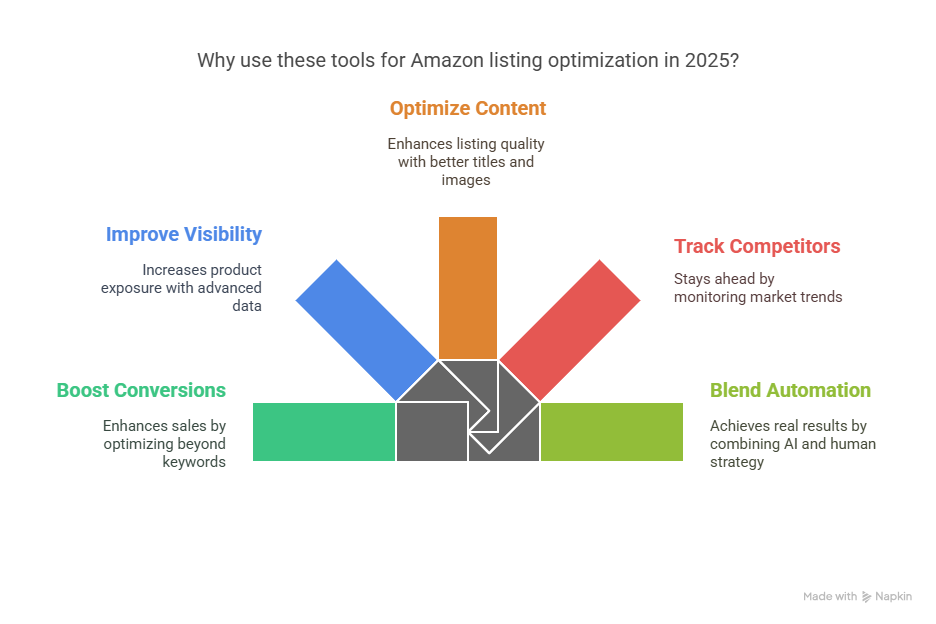
Now, let’s explore the top Amazon listing tools and strategies for 2025 and how you can blend tech with expert support to win more buyers.
1. Listing Mirror: Managing Multichannel Listings Without Errors
If you’re selling on multiple channels, not just Amazon but also Walmart, eBay, and Shopify Listing Mirror is one of the top tools that helps keep your product data consistent. It offers real-time syncing, bulk edits, and, most importantly, control over your catalog without the need for messy spreadsheets.
From what I’ve seen, sellers using this platform reduce listing errors by nearly 40%. But the tool alone isn’t enough. For one of our clients in the health and wellness space, syncing broke because their parent-child variations weren’t mapped correctly. Our team stepped in to clean and standardize the structure, resulting in a 22% reduction in listing errors within 30 days.
Why it’s useful:
Consolidates listings across marketplaces
Makes bulk edits manageable
Prevents mismatched SKUs and pricing confusion
It’s a great backend tool, but human oversight is essential for structure and accuracy.
2. Helium 10: Going Beyond Keyword Research
Yes, Helium 10 is famous for keyword research, but that’s just the start. Its listing analyzer, alerts, and market trend data are just as powerful for keeping listings optimized beyond SEO.
One Amazon service provider client I worked with used Helium 10 only for Cerebro. Once we showed them how to use the Listing Analyzer, we discovered missing bullet point data and backend keyword gaps, resulting in 18% higher impressions after we optimized the listings.
Key features that go beyond SEO:
Listing quality score analysis
Keyword index checker
Hijack and suppression alerts
It’s a powerful tool, but interpreting the insights and applying the necessary changes is where our team excels. Tools flag issues, but humans solve them.
3. Canva + Photoshop: Custom Visuals Still Convert Better
Let’s be honest, stock images don’t cut it on Amazon anymore. I’ve found that custom infographic-style product images convert much better, especially when they clearly show size, use cases, and features.
While AI tools exist to generate images, they often fail to maintain brand consistency. Our graphic team utilizes Canva and Photoshop in tandem to design conversion-driven visuals. For a client in home goods, just redesigning four listing images led to a 31% boost in conversions over 45 days.
Why you should invest in visuals:
A+ content accounts for up to 70% of conversion influence
Infographics reduce return rates by clarifying expectations
Professional design builds brand trust
This is where the human element is irreplaceable. AI can assist, but it can’t understand your customer’s intent like a skilled designer can.
4. Flat File Pro: When Catalog Size Becomes a Problem
Managing hundreds of ASINs using Seller Central? You’ll hit walls quickly. Flat File Pro simplifies the process by letting you manage and upload listings in bulk with fewer errors.
One of our clients had over 2,000 listings in the apparel category. They were using generic AI-based product data standardization tools, but their brand voice kept getting lost. We replaced that with structured uploads and human-led copywriting. The result? A 19% reduction in customer complaints about sizing and descriptions.
Tool advantages:
Easier category template management
Validation for Amazon compliance
Faster uploads, especially during Q4
We support brands with bulk flat file updates every week, and there’s no shortcut for reviewing those details by hand when customer satisfaction is on the line.
5. ZonGuru: Customer Sentiment + Listing Health Tracking
Understanding how buyers respond to your listings is more powerful than just tracking rankings. ZonGuru helps you monitor customer reviews, listing health, and product opportunities based on real buyer feedback.
A beauty brand we worked with used this tool to discover that customers were confused by their ingredient list. We rewrote the bullets and added visual callouts, resulting in a 24% decrease in product returns and a corresponding increase in review scores within two months.
What ZonGuru helps with:
Keyword opportunity alerts
Review tracking with alerts
Listing health scoring
Insights are only helpful if you act on them, and that’s where our Amazon listing creation service really proves its worth.
6. EcomEngine’s FeedbackFive: Automating Review Requests the Right Way
Amazon makes it tricky to request reviews without breaking the rules. FeedbackFive automates this using Amazon’s built-in messaging system, with smart timing based on delivery and product category.
One seller using generic AI-assisted Amazon catalog management saw minimal review growth. When we switched to a human-monitored FeedbackFive campaign with tailored messaging, review counts rose by 37% in 60 days.
Review Request Highlights:
Compliant messaging templates
Smart send time based on delivery
Segment-based targeting for repeat buyers
Reviews are your conversion fuel. Automate the ask, but personalize the tone, that’s the sweet spot.
7. Adtomic by Jungle Scout: AI for Sponsored Products, Guided by Strategy
AI tools for Amazon sponsored products are everywhere now. Adtomic stands out because of how it blends automation with manual control. It can optimize bids, spot underperforming keywords, and generate reports, but the human strategy behind it still matters.
We recently helped a client restructure their PPC campaigns after over-relying on automation. Once we rewrote their ad copy and realigned product targeting, their ACoS dropped from 41% to 23% in under six weeks.
Where Adtomic adds value:
Smart bid automation
Negative keyword suggestions
Campaign structure templates
AI helps speed up campaign tasks, but only humans understand your brand goals deeply enough to steer campaigns effectively.
8. ChatGPT (with Guardrails): Brainstorming Copy and Variations
Now, let’s talk AI. Tools like ChatGPT can help brainstorm bullet points, description drafts, and FAQs. However, and this is a significant point, they need guardrails. I've seen too many sellers use AI-generated copy without editing, which often results in robotic or misleading listings.
We also use ChatGPT internally, but always with a human editor to refine tone, accuracy, and compliance. For one electronics brand, our human-edited AI drafts outperformed raw AI copy by almost two times in conversion rate.
Use ChatGPT for:
Brainstorming A/B test ideas
Creating draft variations for bullets
Generating quick FAQ responses
It’s a tool, not a replacement. In Amazon listing optimization, every word matters.
Case Study: From Basic Listings to Bestseller How We Helped a Home Décor Brand Win
A home décor brand approached us in early 2024 with underperforming listings and stagnant sales, despite a good ad spend. They had tried every Amazon AI listing services but weren’t seeing results. Their issues?
Inconsistent bullet formatting
Vague product specs
Repetitive copy from AI
Weak A+ content visuals
Here’s how our team fixed it:
Manually rewrote 150+ listings with brand-appropriate tone
Designed new infographics and A+ content
Synced inventory across platforms with our custom catalog cleanup
Optimized backend fields like search terms, attributes, and compliance tags
Within 90 days:
Conversion rates improved by 34%
Organic ranking increased across 60% of SKUs
Sales grew by 47% quarter-over-quarter
We don’t just apply tools, we apply experience. That’s what makes us the best Amazon service provider for sellers who want more than automation.
Frequently Asked Questions (FAQs)
1. How often should I update my Amazon listings?
You should audit listings quarterly and update them based on seasonality, reviews, and performance data.
2. Do I need to use AI for product descriptions?
No. AI can help speed things up, but a human editor is crucial to ensure the copy aligns with your brand and avoids compliance risks.
3. Is A+ Content worth the investment?
Yes. Amazon reports indicate that it can increase sales by 3–10%, particularly when content is professionally written and designed.
Key Takeaways
In wrapping up our deep dive into the Top 8 Tools for Amazon Listing Optimization, it’s clear that successful sellers don’t just rely on keywords; they build strong foundations backed by strategy, design, and real product knowledge. Tools can help streamline your workflow, but it's the human insight that turns traffic into conversions.
Here are three key takeaways to remember:
Pair AI with Human Expertise: AI tools for listings, content, and ads can speed things up, but they need skilled human input to truly perform. From editing AI-generated text to crafting brand-aligned visuals, real people still make the difference.
Optimize Beyond SEO Basics:Success on Amazon now means going beyond keyword stuffing. Focus on full-funnel optimization visuals, A+ content, product specs, and customer sentiment, all of which contribute to visibility and conversions.
Tools Support, People Strategize: Use tools like Helium 10, Adtomic, or FeedbackFive for automation, but rely on a professional Amazon listing service to align everything under one strategy. Without that, even the best tools fall short.
We’ve explored the real tools making an impact in 2025, but also what separates top sellers from the rest: a blend of smart tech and smarter humans. If you’re looking to optimize your listings the right way, our team is here to help.
To stay up-to-date on Amazon marketing trends, product optimization tips, and customer support insights, remember to follow Amazon Listing Services on our social media platforms: Facebook, Instagram, and LinkedIn.
We’d love to hear your thoughts, drop your questions or experiences in the comments, and let’s keep the conversation going!
The majority of customers shop on Amazon through search
This means that they know what they are looking for. All they have to do is type in the right keyword—often using tools like Jungle Scout Amazon—to find the product.
For Amazon sellers, this is enough to realize they need to increase their visibility within Amazon’s organic search algorithm. There are hundreds of Amazon sellers offering the same product under different brand names. So, why do you think customers should buy from you?
You should be able to address the pain points your competitors often ignore. And what do you think can work best to handle those concerns while also showcasing your products?
Enhanced Brand Content Can Save You!
With that being said, Amazon content creation, especially using Amazon Enhanced Brand Content, is more important than ever for helping your products stand out.
From the beginning to the end of the omnichannel Amazon customer journey, you need to grab every chance to show buyers why your products are the best option. Two key parts of this strategy are content creation and content optimization.
With Amazon Enhanced Brand Content (EBC), you can boost your Amazon conversions significantly. It’s a feature that allows sellers to enhance product listings using rich media content—key to any Amazon omnichannel strategy.
This post explains how EBC can increase conversion rates, traffic, and overall sales when used correctly.
What is Enhanced Brand Content, and How Does it Help with Amazon Content Creation and Enhancement?
Amazon Enhanced Brand Content, also known as Amazon A+, was introduced in 2016 for brand-registered sellers. It allows sellers to highlight unique features of their products using enhanced text and images.
In short, it’s a premium tool for sellers that lets them replace dull product descriptions with engaging, informative, and optimized content—especially useful for those focusing on Amazon omnichannel visibility.
This feature allows you to tell your brand story, include comparisons, and give your listings a polished look. When done right, your product detail pages will attract more traffic and improve sales—just like in the case of Apple, which perfectly demonstrates a strong omni-channel logistics Amazon approach.
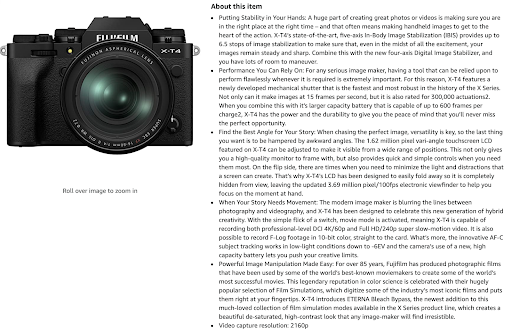
Here’s a visual comparison from Apple and Fujifilm listings:
Apple uses Enhanced Brand Content to optimize its listing:
Fujifilm uses basic text:
It’s easy to see which listing is more attractive. Customers can’t touch or test the product, so great visuals and copy are essential. Apple’s use of EBC makes the product easier to understand and more appealing—showcasing a textbook Amazon omnichannel case study.
No wonder Apple’s Amazon sales are climbing!
How Enhanced Brand Content Results In Improving Amazon Conversions?
EBC is becoming more popular among sellers. They are using it to fine-tune listings and boost both traffic and conversions—an essential part of any omni retailers plan.
It gives a detailed yet engaging view of how the product helps the buyer and solves problems.
Listings become more attractive with high-quality images, a must for any Amazon omni channel strategy.
It improves how your brand-registered content is presented and increases its reach.
EBC breaks down complex info into easy-to-understand chunks with images and data.
Good product descriptions minimize the risk of bad reviews or returns.
Most importantly, EBC builds an emotional connection with the buyer—key to long-term loyalty in an omnichannel Amazon model.
How Can You Optimize Your Amazon Listing With EBC?
There are multiple ways to make the most of Amazon Enhanced Brand Content:
Show customers how the product fits into their life.
Use high-resolution, professional images.
Choose easy-to-read fonts and words for quick scanning.
Organize content so it’s easy to follow—like Apple’s side-by-side iPhone comparison.
Give a complete product description with visuals to reduce misunderstandings.
Use EBC to tell your brand story and build loyalty—especially important if you’re aiming for an Amazon omnichannel experience.
For sellers using the Jungle Scout Amazon route to find what products work, combining that research with high-quality EBC can significantly boost conversions.
Amazon Enhanced Content Is Also A Way Into SERPs
When we talk about better conversions through Amazon Enhanced Brand Content, we can’t forget its effect on search engines. Many Amazon omnichannel sellers don’t realize that EBC is also indexed by Google.
All the text and images in EBC pages can appear in search results—helping your listings show up more often. This visibility supports your broader Amazon omnichannel strategy, boosting organic traffic and increasing conversions.
⚠️ Note: EBC content in images won't help Amazon SEO directly, as images can’t be crawled for keywords. For SEO benefits, use keywords like “omnichannel Amazon” and “Amazon omni channel” in your product titles and descriptions.
Conclusion
In conclusion, Amazon Enhanced Brand Content is a powerful tool for sellers looking to increase conversions and sales quickly. It’s an essential part of Amazon content creation and a must-have for any Amazon omnichannel seller.
To avoid complications and maximize your listing’s performance, follow Amazon’s guidelines carefully when creating EBC.