


Last updated on July 30th, 2026
A product listing can look complete on the surface, with a strong title, clean bullet points, and good images, and still underperform in search because of what's missing behind the scenes. Backend keywords are the part of an Amazon listing that shoppers never see, yet they carry real weight in whether a product surfaces for the searches that matter. Sellers who treat this field as an afterthought are leaving indexing opportunities on the table, while sellers who understand how Amazon's search engine actually reads these fields tend to see broader visibility without touching their front-end copy at all.
This guide covers what backend keywords are, how Amazon's algorithm uses them, the technical rules that govern the field, where to enter them in Seller Central, how to research terms worth including, and how to verify that your keywords are actually indexed. It also looks at where AI-driven search is pushing backend optimization next.
Table of Contents
What Are Amazon Backend Keywords?
Why Amazon Backend Keywords Matter
Where to Add Backend Keywords in Seller Central
How to Find High-Converting Backend Keywords
Amazon Backend Keyword Best Practices
Common Backend Keyword Mistakes
What Are Amazon Backend Keywords?
Backend keywords are search terms entered into a hidden field within a product listing's backend attributes in Seller Central or Vendor Central. Shoppers never see this text. It doesn't appear in the title, bullet points, description, or anywhere on the live product page. Its only function is to help Amazon's search engine, A9/A10, understand additional ways customers might search for a product.
Amazon's search algorithm indexes a listing based on multiple fields: the title, bullet points, product description, and backend search terms. Front-end keywords, the ones visible in the title and bullets, need to read naturally because they're written for customers as much as for the algorithm. Backend keywords carry no such constraint. They exist purely for indexing, which means a seller can include synonyms, alternate spellings, and related terms that would look awkward or repetitive if forced into visible copy.
The distinction matters operationally. A title has to sell the product at a glance. The backend field has to catch every reasonable variation of how someone might phrase a search, without worrying about readability, grammar, or brand tone.
Get more from every Amazon listing with expert keyword research, optimization, and ongoing management.
Why Amazon Backend Keywords Matter
Backend keywords influence four areas of listing performance, and each has a direct line to revenue.
- Organic ranking: Amazon's algorithm matches search queries against indexed terms across a listing. A product that's indexed for more relevant search terms has more opportunities to appear in results, which is the first condition for ranking at all.
- Product discoverability: Customers rarely search using the exact vocabulary a brand uses internally. A kitchen brand might call a product a "storage container," while shoppers search "meal prep box" or "food organizer bin." Backend keywords bridge that vocabulary gap without cluttering the visible listing.
- Search indexing: Amazon needs to associate a listing with specific query terms before that listing becomes eligible to appear for those searches. Backend keywords are one of the primary mechanisms for building that association, particularly for terms that don't fit naturally into the title or bullets.
- Conversion relevance: Indexing for the wrong terms can drive traffic that doesn't convert, which hurts a listing's conversion rate and, over time, its ranking. Backend keywords should target terms that reflect genuine purchase intent, not just search volume.
Amazon Backend Keyword Rules
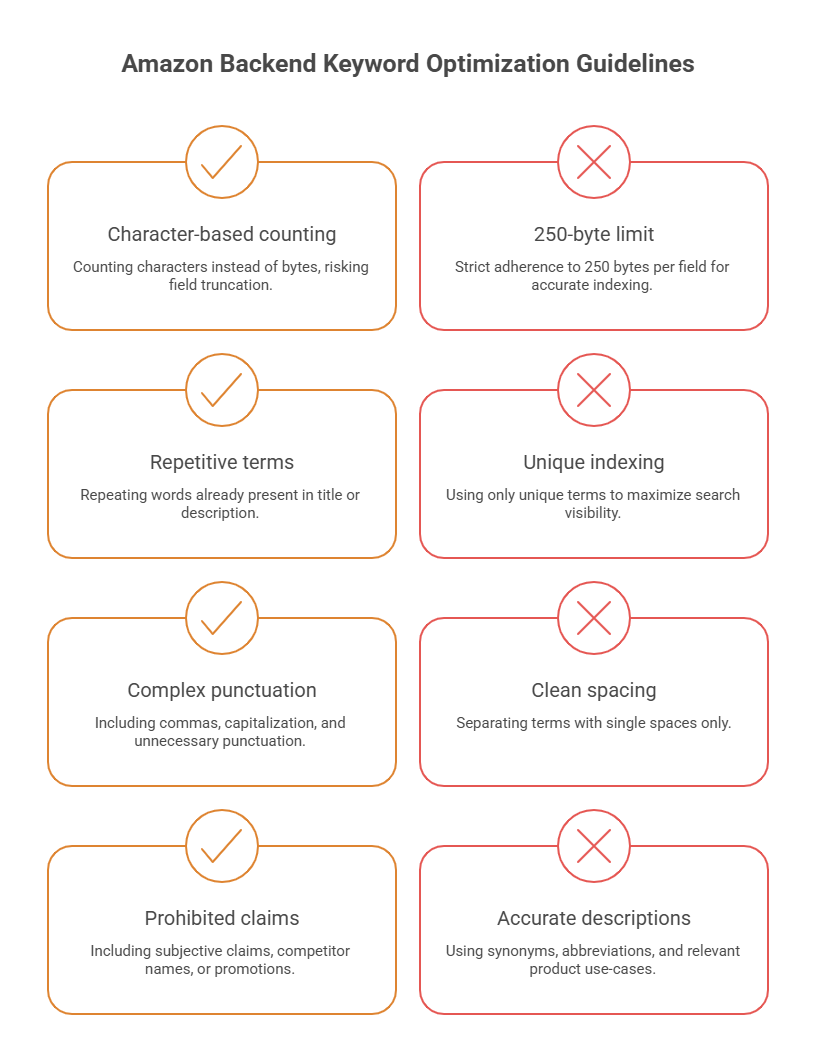
Amazon enforces a specific set of technical constraints on the backend search terms field. Getting these wrong doesn't just waste space; it can cause Amazon to ignore the entire field or, in some cases, suppress the listing.
|
Rule |
Detail |
| Byte limit | 250 bytes per backend keyword field (not 250 characters; some characters, especially in non-Latin scripts, use more than one byte) |
| Duplicates | Repeating a word already in the title, bullets, or description wastes byte space and adds no indexing value |
| Formatting | No commas needed between terms; separate with single spaces. No need for punctuation, capitalization, or keyword repetition |
| Prohibited content | No competitor brand names, no subjective claims ("best," "cheapest"), no ASINs, no temporary promotional terms ("free shipping," "on sale") |
| Brand restrictions | Amazon prohibits using another brand's trademarked name in backend fields, and this can trigger listing suppression if flagged |
| Allowed variations | Synonyms, alternate spellings, abbreviations, and relevant use-case terms are permitted as long as they accurately describe the product |
Where to Add Backend Keywords in Seller Central
Backend keywords are entered through the listing editor, not the main product page fields.
- Log in to Seller Central and go to Manage Inventory.
- Select the product and click Edit.
- Navigate to the Keywords tab (this may appear as "Search Terms" depending on the account view and marketplace).
- Locate the Search Terms field and enter relevant terms, separated by spaces.
- Save the changes and allow time for Amazon to reindex the listing, which can take anywhere from a few hours to a couple of days.
Beyond the primary Search Terms field, some categories expose additional backend attributes worth using:
- Subject Matter fields: This field lets sellers add category-specific descriptive terms that support indexing beyond the main search terms box.
- Target Audience fields: It allows sellers to specify who the product is designed for (for example, age range or use case), which can support indexing for audience-specific searches.
Other backend attributes such as material type or intended use vary by category and should be filled out completely. Amazon can pull indexing signals from these structured fields as well as the free-text search terms box. Filling out every available backend attribute, not just the main keyword field, gives Amazon more structured data to match against customer searches.
How to Find High-Converting Backend Keywords
Effective backend keyword research pulls from several sources rather than relying on guesswork. Each method surfaces a different type of term, and combining them produces a more complete keyword set than any single source alone.
|
Method |
What It Reveals |
| Amazon Search Suggestions | Autocomplete phrases Amazon surfaces as customers type, reflecting real, current search behavior |
| Competitor Analysis | Terms competitors are targeting in their titles and bullets, useful for identifying gaps in your own listing |
| Reverse ASIN Research | Keywords a specific competitor ASIN is already ranking for, typically pulled through third-party research tools |
| Brand Analytics | Search frequency and click/conversion share data available to registered brand owners through Seller Central |
| Search Query Performance Reports | Data on which search terms are already driving impressions, clicks, and purchases for your own listings |
| PPC Search Term Reports | Actual customer search terms that triggered ad clicks and conversions, pulled from Sponsored Products campaigns |
| AI-Powered Keyword Research Tools | Third-party tools that use language models to generate synonym clusters and long-tail variations at scale |
Search Query Performance and PPC search term data are generally the most reliable sources, since they reflect confirmed customer behavior on your own products rather than estimated volume. Reverse ASIN research and competitor analysis are useful for finding terms you haven't considered, while Amazon Search Suggestions and AI-powered tools help round out long-tail and synonym coverage.
How to Check Keyword Indexing
Adding a keyword to the backend field doesn't guarantee Amazon has indexed it. Verifying indexing is a separate step.
- Manual ASIN method: Search the exact keyword phrase on Amazon, then use the "ASIN search" trick: search the keyword followed by your product's ASIN in the search bar. If the listing appears, it's indexed for that term. If it doesn't appear at all, even far down the results, it likely isn't indexed.
- Index checking tools: Several third-party tools automate this process by checking a batch of keywords against a listing simultaneously, which is faster than manual checks when working with a large keyword set.
- Monitoring performance: Beyond a binary indexed/not-indexed check, it's worth tracking whether indexed terms are actually generating impressions and clicks through Search Query Performance reports. A term can be indexed and still contribute nothing if it doesn't reflect real search demand.
Amazon Backend Keyword Best Practices
A well-optimized backend keyword strategy helps your products appear in more relevant searches while making the most of Amazon's limited keyword space.
- Include Synonyms: Add alternative words and phrases customers commonly use to describe the same product. This expands your keyword coverage without repeating terms already used in the title.
- Include Common Misspellings: Add frequently misspelled versions of relevant keywords where appropriate. Amazon can still match these searches, helping your listing capture additional traffic.
- Prioritize Long-Tail Keywords: Focus on specific, multi-word search phrases that reflect stronger purchase intent. These keywords are often less competitive and more likely to drive qualified traffic.
- Add Regional Spelling Variations: Include spelling differences used across English-speaking marketplaces, such as color and colour. This improves discoverability for customers in different regions.
- Include Contextual Phrases: Add keywords related to product use cases, occasions, or customer needs. These terms help your listing appear for searches that don't directly mention the product category.
- Update Keywords Seasonally: Review and refresh backend keywords to reflect seasonal trends, holidays, and changing customer search behavior. Regular updates help keep your listing relevant throughout the year.
Common Amazon Backend Keyword Mistakes
Avoiding these common mistakes ensures your backend keywords remain relevant, compliant with Amazon's guidelines, and effective at improving product visibility.
- Keyword Stuffing: Avoid repeating the same keyword in multiple forms. Doing so wastes valuable backend space without improving search visibility.
- Duplicating Title or Bullet Keywords: Do not repeat keywords that already appear in your title or bullet points. Amazon already indexes visible listing content, making duplication unnecessary.
- Using Competitor Brand Names: Never include competitor trademarks or brand names in backend keywords. This violates Amazon's policies and can result in listing suppression.
- Exceeding the Byte Limit: Keep your backend keywords within Amazon's 250-byte limit. Any terms beyond this limit are typically ignored during indexing.
- Leaving Outdated Keywords: Remove seasonal, discontinued, or no-longer-relevant terms during regular optimization. Replacing them with current keywords makes better use of the available space.
AI and the Future of Amazon Backend Keywords
Amazon's search experience is shifting, and backend keyword strategy is shifting with it. Amazon has been integrating generative AI features into the shopping experience, including tools that summarize products and answer shopper questions directly within search and product pages. This changes how listings need to be indexed, since AI-generated answers pull from the same structured and unstructured listing data that traditional search ranking relies on.
As more customers use natural-language queries, whether through voice assistants or AI shopping tools, exact-match keyword phrases matter less than semantic coverage. A backend field built entirely around short, literal keywords may miss the longer, conversational phrasing these tools generate.
Search relevance is increasingly evaluated on contextual meaning rather than literal keyword matching alone. This favors listings with a well-rounded backend field that includes use-case language and related concepts, not just a list of isolated nouns.
Conclusion
Backend keywords are a low-visibility, high-leverage part of Amazon listing optimization. They don't require rewriting a title or redesigning bullet points, but they do require research discipline, attention to Amazon's technical formatting rules, and periodic review as search behavior and seasonal demand shift.
Getting this field right expands how many relevant searches a listing can appear in without compromising the customer-facing copy that's built to convert. For sellers looking to build a more systematic approach to Amazon listing optimization, this is an area where dedicated operational support tends to pay for itself in recovered visibility.
Frequently Asked Questions
1. What is the backend keyword limit?
Amazon allows up to 250 bytes per backend search terms field. This is a byte limit, not a character or word count, so multi-byte characters and long words can use up the available space faster than expected.
2. Do backend keywords improve rankings?
Backend keywords support indexing, which is a prerequisite for ranking. They help a listing become eligible to appear for a wider range of relevant searches, but they work alongside other ranking factors like conversion rate, sales history, and pricing, not as a standalone ranking lever.
3. Should I repeat title keywords in the backend field?
No. Terms already present in the title, bullets, or description are typically already indexed through those fields, so repeating them in the backend field wastes limited byte space that could go toward new terms.
4. Can I use competitor brand names as backend keywords?
No. Amazon's policies prohibit using another brand's trademarked terms in backend fields, and doing so can result in listing suppression or account-level enforcement action.
5. How often should backend keywords be updated?
A quarterly review is a reasonable baseline for most categories, with additional updates ahead of relevant seasonal periods or after launching new campaigns that reveal new high-performing search terms.
6. Are backend keywords different for Vendor Central?
The underlying concept is the same, though the interface and available backend attribute fields can differ slightly between Vendor Central and Seller Central depending on category and account setup.
7. Do backend keywords affect PPC?
Backend keywords primarily affect organic indexing rather than Sponsored Products targeting directly, since PPC campaigns use their own keyword targeting settings. However, strong organic indexing can support overall listing relevance, which indirectly benefits advertising performance.
8. How can I verify keyword indexing?
Use the manual ASIN search method, a third-party index checking tool, or Search Query Performance reports to confirm whether a specific term is indexed and whether it's generating actual search traffic.